Use this reference to review the specifications for the Element Parameter Versus Host check.
The element parameter versus host check verifies a common parameter between element and host element.
Overview
| Description: | Checks that an element parameter matches a common host parameter. |
| Evaluation Criteria: | Checks if a common parameter matches between an element and its host element. |
| Limitations: | Parameters have to have the same value type. |
| Document Types: | All |
| Filters: | Elements |
| Highlighting: | No |
| Info Tab: | Displays failed element parameter and its host element parameter. Select element to zoom to it. |
| Correction: | Yes: Copies parameter value from host to element.
WARNING: Automatic correction of Type parameters from multiple hosts can cause unpredictable results. |
Examples where this template might be used
- Find doors where the Fire Rating does not match the Wall Fire Rating.
Details
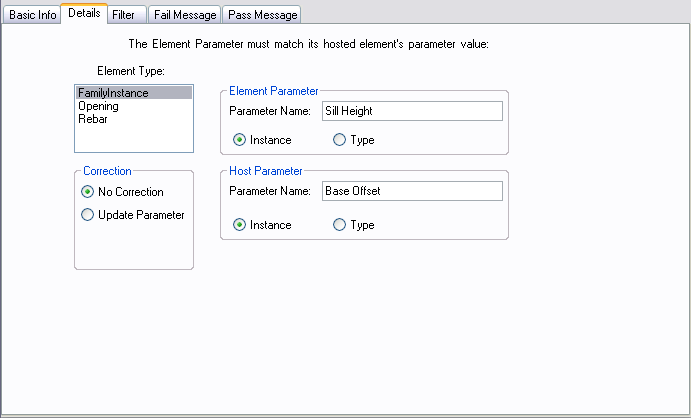
Options:
| Option | Usage |
| Element Type(s) | Element type to check. |
| Element Parameter Name | Name of the element parameter. |
| Element Instance | Select element instance parameters. |
| Element Type | Select element type parameters. |
| Host Parameter Name | Name of the host element parameter. |
| Host Instance | Select host element instance parameters. |
| Host Type | Select host element type parameters. |
| No Correction | No correction is allowed. |
| Update Parameter | Correct by updating the element parameter value with the host element parameter value. |
Pass/Fail Report Options:
Value(s):
Available by right clicking in the Pass/Fail Messages Editor, then choosing Insert>>Value.
| Reportable Variable | Description |
| CheckName | Name of the check. |
| CheckResult | Result of the check. Passed/Failed |
| FilterSize | Size of the selection filter. |
| NumBadElements | Number of failed elements. |
Table(s):
Available by right clicking in the Pass/Fail Messages Editor, then choosing Insert>>Table.
| Reportable Variable | Description |
| ElementTable | Table displaying all failed elements. |
Results
After the check is run and if the criteria failed, a fail message is displayed. If the criteria passed then a pass message is displayed.