Adding Files to Scene
Learn how to load files into VRED.
When adding files to scene, you need to take into consideration the file type. VRED supports an assortment of file formats and types. Before adding files to VRED, consult the section below.
Support File Formats and Types
Many types of files can be imported and added to VRED scenes. Try other VRED scenes, XML or Python files, and files created by other applications, such as 3ds Max. When importing, if there is an issue with the import, you can abort it at any time during the process.
Here is a list of supported file formats and types:
- CAD: .apf, .asm, .catpart, .catproduct, .cgr, .dlv, .dlv3, .dlv4, .dwg, .dwf, .dxf, .exp, .g, .iam, .iges, .igs, .ipt, .jt, .mdl, .model, .neu, .prt, .session, .sldasm, .sldprt, .step, .stp, .wire
- Cosmo Binary: Cosmo3D/Optimizer Geometry .csb, Deltagen Geometry .rtx, Deltagen Animations .wrl, Deltagen Variants .xml
- PLM XML: Imports product structure files with .plmxml file format.
Maya Files
Maya .ma and .mb files can be added to a scene; however, not everything in the scene may be supported. A lot of Maya data that cannot be loaded into VRED. Therefore, .ma and .mb files should be avoided. We recommend you use FBX (the recommended exchange format between Maya and VRED), as it is superior to .ma and .mb.
If you still are hoping to load .mb files into VRED, here's a list of what is supported. All other things, such as animation, rigging, and skinning, will be lost.
| Where in VRED | What comes through |
|---|---|
| Scene Graph | Node Names, Transformations, Rotations, Scaling |
| Lights | Directional Lights, Point Lights, Spot Lights, Area Light |
| Materials | Material Names, Diffuse Color, Glossy/Specular Color, Incandescent Color, Transparency |
Alias Files
When importing Alias files, first unify all the surface normals to face the camera in Alias. Set Visual normals, rather than Geometric normals, to avoid disturbing the history of the model.
CAD Files
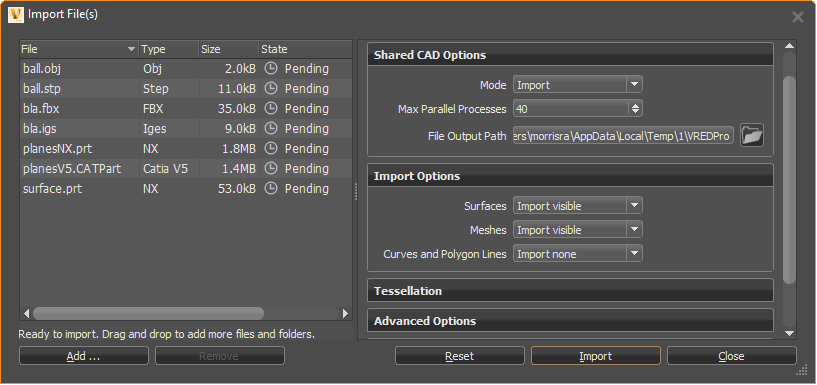
When working with CAD files, import multiple files in one shot. In the Import File(s) dialog, you will see the imported CAD files listed.
Showcase Files
Showcase files are not supported in VRED 2018 and beyond. You can open a Showcase file in a version of VRED before 2018, save the file as a .vpb, then open in VRED 2018 or later.
How to Add a File to a Scene
- Optional: Select a node in the Scene Graph below where you want to add the file or animation.
- In the Menu Bar, select File > Import.
- Select one or more files to add them to the scene and click Open.
Click Import.
The file or files are added to the Scene Graph as child nodes of the selected node.
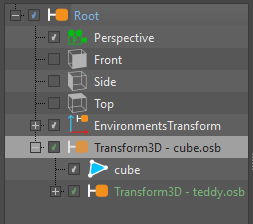
If no node was selected in the Scene Graph, the objects are added as children of the root node.
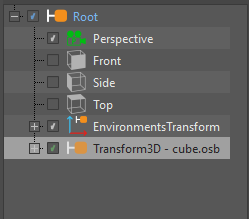
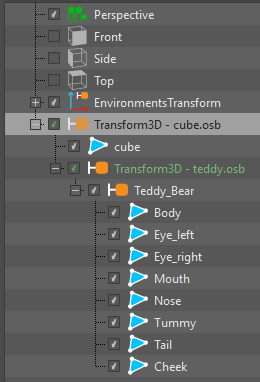
All objects of an added file are grouped in a group node. Imported files are marked green in the Scene Graph.
How to Add an Animation to a Scene
You can add VRML animations to a scene, provided they include the objects being animated.
- In the Menu Bar, select File > Import Scene Data > VRML Animation.
- Select an animation to add to the scene.
- Click Open.
How to Import Information to a Scene
You can import various file types and meta information to a scene.
- In the Menu Bar, select File > Import Scene Data.
Select the type of information you want to import, then click Open:
- CSB Animation/Variants - Imports .csb animation or variant files into the current scene.
- Render Jobs - Imports jobs from the Render module into the current scene. (XML Render Queue Description .xml)
- Rendering Meta Data - Imports images rendered with VRED (.png, .jpg, .tiff, .exr) containing scene settings, embedded as meta data in the Rendering Meta Data. These settings are applied to the loaded scene.
- Sequences - Imports arrangements from the Sequencer module into the current scene (XML Sequencer Description .xml). A sequence setup for the Sequencer module can be added to the scene.
- Variants - Imports variants from the Variant Sets module into the current scene (XML Variant Description .xml). A variant setup for the Variants and VariantSets module can be added to the scene.