You can add a logo overlay on output, in real time.
To add a logo, make sure your graphics card is selected in the engineering menu of the VTR Output module. If AJA_OEM2K is selected, you cannot use the Logo Overlay feature.
To select the card in the Output Clip menu:
- Open the Output Clip menu.
- From the Graphics Card box, select GFX SDI.
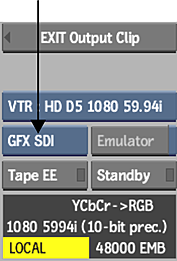
If you do not see GFX SDI as an available option in the Graphics Card box, it is either not installed, or it is not set up or configured properly.