Finally, since the 2 mm tool does not remove all the material in the R0.5 mm fillets, create a third Pencil operation with a 1 mm ball mill to handle those fillets.
- On the ribbon, click
CAM tab
 3D Milling panel
Pencil
3D Milling panel
Pencil
 .
.
 Tool tab
- On the Tool tab, click the
 button.
 - From the Sample Libraries > Tutorial tool library, select tool #24 - Ø1 mm ball.
- Click
 to close the Tool Library dialog.
 Passes tab
- Click the Passes tab.
- Set Stepover: to: 0.05 mm
- Set Number of stepovers: to: 15
Start the Calculation
- Click
 at the bottom of the Operation dialog box, or right-click in the graphics window and select OK from the marking menu, to automatically start calculating the toolpath.
The toolpath is now calculated and a preview appears in the graphics window.
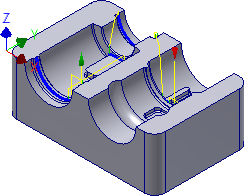
The part is now finished within the tolerances specified in the various operations, and the only stock that is remaining is that between the stepovers of the various toolpaths. To obtain an even better finish, edit the operations and use a higher tolerance and smaller steps in the toolpath.
Continue to To Post Process the Part (Tutorial 5)...