GPU Acceleration
Processing with the Graphics Processing Unit (GPU) is available for certain features and is faster than processing with the Central Processing Unit (CPU).
Support for GPU acceleration depends on the version of the NVIDIA graphic card that is installed on your system. The following configurations are supported for GPU acceleration.
| Configuration | Feature available? |
|---|---|
| FX5800 | Yes |
| FX5600 | Yes |
| FX5500 | Yes (except Noise plugin 3.1) |
Due to the enhancements in the GPU, we do not recommend using Lustre to render grades created in Lustre 2011 or earlier if you are looking for pixel accuracy rendering.
GPU acceleration is available for the following features:
- Playback of cached degrained frames
- 1D or 3D on calibration LUTs
- Animated or still repositions (including rotations)
- Animated or still input primary grading
- Input and output primary grading with RGB, hue and light saturation (LS) curves
- Secondary grading with RGB curves
- Secondary grading with hue curves
- Secondary black clip/reference and white clip/reference in Linear mode
- Secondary key cleanup and shrink
- Imported mattes for secondaries
- Gamma and contrast adjustments to secondaries in Linear mode
- Low, mid, and high adjustments to secondaries
- Input and render/output LUT
Lustre Sparks plugins:
- Blur mix
- Glow
- Noise plugin 3.1
- Printbleach
Note:A performance hit can occur when using the Lustre Sparks plugins.
For more information about these features, see:
GPU acceleration is also available for certain secondary grading features with up to 48 secondary layers enabled. You can apply, and optionally animate, each of the following secondary grading features and continue to use GPU acceleration:
- Primary grading inside and outside geometries, including adjustments to overall brightness, contrast, hue, and saturation
- Softness, Colour, and Opacity slider values for geometries, with Softer and Variable optionally enabled
- Key-in shapes based on hue, luminance, and saturation, and refined by tolerance and softness range definition
Key and geometry blurs
Note:A performance hit can occur when using the geometry blur.Multiple point changes for geometries
For more information about these features, see Secondary Colour Grading.
When GPU acceleration is enabled, the histogram, vectorscope, and waveform monitors do not dynamically update. They retain the colour distribution of the image before GPU was enabled.
The following parameters cannot be accelerated by the GPU. These parameters are processed by the CPU instead.
Lustre Sparks plugins:
- Add noise
- Blur
- Defocus
- Directional blur
- Field zoom
- Gold
- Noise plugin 2
- Noise plugin 3
- Silver
To enable GPU acceleration:
Do one of the following:
- Click GPU.
- Press Y.
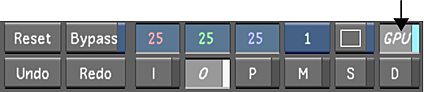
A GPU flag appears in the upper-right section of the Player.
 Note:GPU acceleration only works in progressive scan mode. Before you render a project, you need to switch the scan type to interlaced (located in the Setup > Grade menu).
To disable GPU acceleration:
Do one of the following:
- Click GPU.
- Press Y.
GPU acceleration is disabled.