Cached Playback
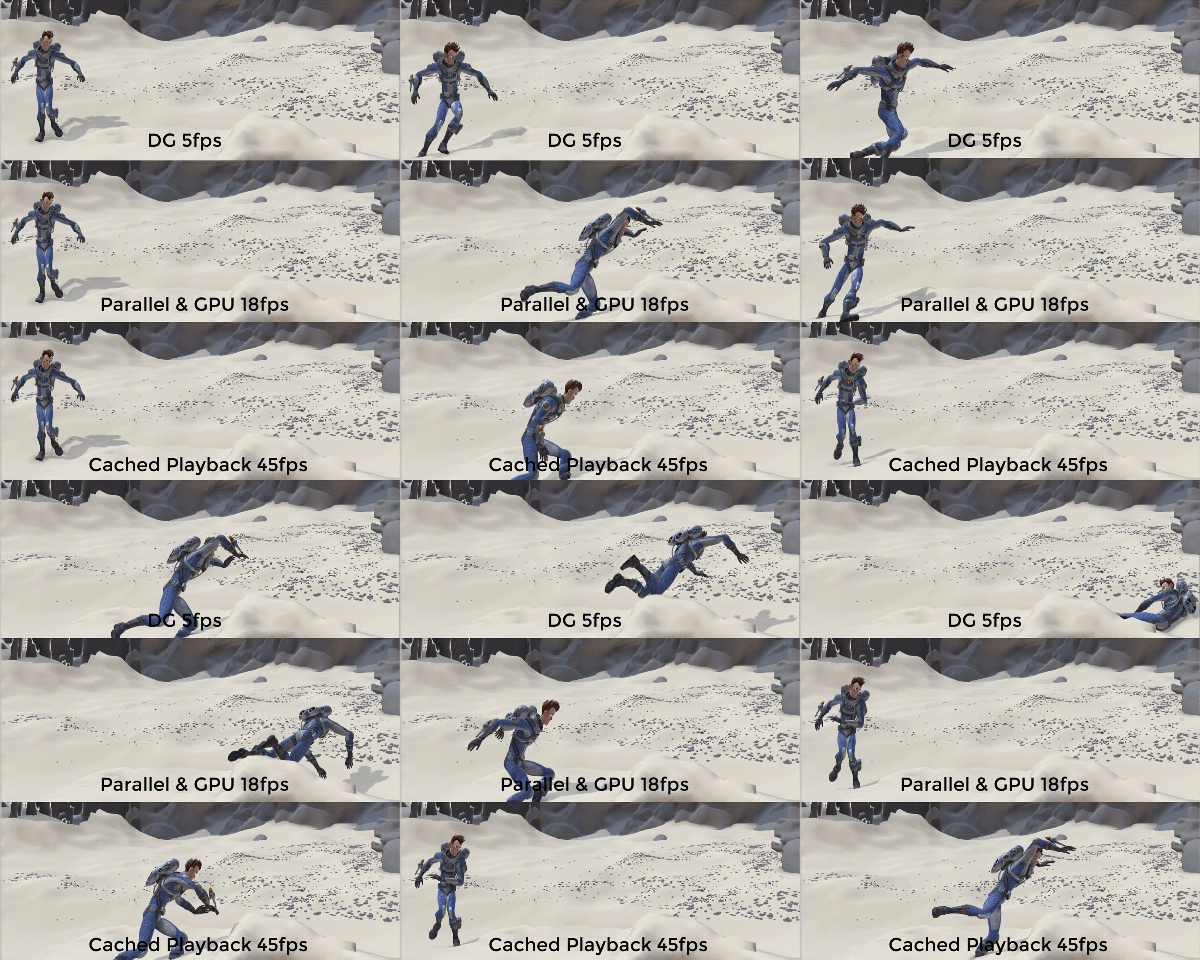
Cached Playback lets you see changes made to your animation without the need to create a playblast. It appears as a blue stripe running along the bottom of the Time Slider.
Previously, each time you modified a scene, Maya would need to update and redraw. To see your edits, you often had to Playblast. Depending on the size of the scene and changes made, these updates were time-consuming. Now, your scene is automatically cached as you work and Maya only recomputes the part of the animation that's changed, rather than redrawing the whole scene.
To activate or disable caching for your scene
Click the
Cached Playback icon
 in the
Playback Options or right-click the
Time Slider and select
Cached Playback from the menu (you can also choose a
caching mode from this menu as well).
in the
Playback Options or right-click the
Time Slider and select
Cached Playback from the menu (you can also choose a
caching mode from this menu as well).
Whenever you edit a scene that has been cached, a part of the Time Slider turns gray to show the segment of the animation that is out of date before becoming blue again to show that the values have been updated. See the Cached Playback status line states topic.
- Caching Modes
- Because Cached Playback stores your animation in memory, you can further optimize playback by choosing the best caching mode for your setup, as each method has attributes that give better performance depending on your current hardware setup.
- Experiment with different modes to see what provides the best performance gain. You can change
Cached Playback modes by right-clicking either the
Cached Playback icon
or the
Time Slider. See
Choose a mode for Cached Playback for more about the different modes.
Evaluation Toolkit
- Debugging section
-
The Evaluation Toolkit Debugging section has been enhanced with new features for graph inspection. Now you can view the Evaluation Graph and the Scheduling Graph in both text and visual (PDF) formats. In addition, you can also now filter the graphs so that only a subsection is displayed, making it easier to inspect very large graphs.
- Cycle clusters section
-
The Cycle Clusters section has been updated to make cycle cluster investigation easier to locate nodes in a specific cycle, which allows you to address cycle clusters that could impede performance. New options have been added to facilitate cluster identification from node selection within the scene.
- Custom Evaluators section
-
The Custom Evaluators section has a new n button that opens a window where you can view a list of nodes claimed by the associated custom evaluator.
- Modes section
-
A new Idle Action setting has been added to the Modes section of the Evaluation Toolkit to let you disable the automatic Cache Evaluation. The Idle Action setting lets you set whether Cache evaluation occurs:
Setting Behavior Idle Rebuild and Prepare for Manip This setting is the recommended default. Off Nothing happens when Maya is idle. To trigger the graph rebuild and build the cache, you must perform an action, such as changing the time. Idle Rebuild Rebuilds the cache only when the graph is invalidated. Only rebuilds and prepares evaluation using the Evaluation Manager, but no partitioning or scheduling occurs. To trigger the partition and scheduling, you need to perform an action, such as chaning the time. Idle Prepare for Manip Rebuilds the cache only when the graph is built, or when graph partitioning is invalidated. The graph must be rebuilt manually. This action rebuilds the cache if caching is enabled.
Viewport 2.0 performance enhancements
A number of common workflows in Viewport 2.0 are now much faster than before. These include:
- Files now load faster in Viewport 2.0.
- Selecting / Deselecting objects is faster.
- Pre-select highlighting now performs faster on dense meshes.
- Snapping performance has been improved.
- Memory management in Viewport 2.0 has been improved by gracefully down-sampling large textures. This means that the Viewport in Maya 2019 can more easily display textures in scenes that previous versions might have had difficulty with. For more information, see Viewport 2.0 options.
New Profiler view options
- Show Critical path
- Lets you view the sequence of evaluation tasks that determine the minimum time needed to compute a frame.
- Collapse Selected events/Collapse Selected events repetition
- Lets you collapse all child events (started on the same thread and contained within the time interval of the parent events, that is, higher on the event stack) into the selected event(s). Select Collapse Selected events repetition to collapse not only selected events, but also their repetition in any other frames. So if you collapse them, they are also hidden in other frames.
- Expand Selected events/Expand Selected events repetition
- Lets you restore all child events which were collapsed into the selected event(s). Select Expand Selected events repetition to expand not only selected events, but also their repetition in any other frames. So if a selected event is expanded, they also show in other frames.
Invisibility Evaluator updates
A new View Select element has been added to the Evaluation Toolkit Invisibility Evaluator for those who use a View Select workflow to restrict objects from evaluation. Previously, the Invisibility Evaluator considered only the DAG visibility of objects, and so using Show > Isolate select > View Select to hide objects did not provide any performance gain.
- Uses View Select sets for visibility, but only when a single modeling pane is open
- Updates whenever there are changes to the modeling pane visibility
- Invalidates the scheduling graph when a View Select operation is done (or undone)
Limitations
- Works when only one modeling pane is open and only if that pane is in View Selected mode
- Updates only when the active view is changed, not when switching between layouts (If this occurs, invalidate the Evaluation Graph by using the command evaluationManager -inv on)
HIK evaluation
A new HIK evaluator increases the speed of HumanIK characters by up to 6 times and is on by default. You can compare playback speed by disabling the in the Custom Evaluators section of the Evaluation Toolkit.
Annotate nodes in the Profiler
You can now tag nodes so that you can identify them in the Profiler. Assign tags to a collection of nodes, for example "arm", "face", and so on, for a more convenient way to locate and isolate elements in Profiler otuput data. The tagging system uses two sets of metadata on nodes: one for the node name and one to assign a color.
You can add Profiler Tags with the following Python script:
global proc addProfilerTag(string $tagValue, int $r, int $g, int $b)
{
To add the profile tag data structures use:
    dataStructure -format "raw" -asString "name=NodeProfileStruct:string=NodeProfileTag:int32=NodeProfileTagColor";

To set the channels, use:
    addMetadata -streamName "ProfileTagStream" -channelName "ProfileTag" -structure "NodeProfileStruct";
    addMetadata -streamName "ProfileTagColorStream" -channelName "ProfileTagColor" -structure "NodeProfileStruct";

To set the data:
    editMetadata -streamName "ProfileTagStream" -memberName "NodeProfileTag" -channelName "ProfileTag" -stringValue $tagValue -index 0;

    editMetadata -streamName "ProfileTagColorStream" -memberName "NodeProfileTagColor" -channelName "ProfileTagColor" -value $r -index 0;
    editMetadata -streamName "ProfileTagColorStream" -memberName "NodeProfileTagColor" -channelName "ProfileTagColor" -value $g -index 1;
    editMetadata -streamName "ProfileTagColorStream" -memberName "NodeProfileTagColor" -channelName "ProfileTagColor" -value $b -index 2;
}
New Packed Attribute data in .ma and .mb file formats
A new feature has been added to reduce the size of files and improve load times by packing certain attribute data into blocks, where each setAttr command can now set values for a range in the parent multi, for example, setAttr skinCluster.weightList[0:122].weights 4 1 2 3 4 4 5 6 7 8 4 8 9 10 11. Previously, this type of data would have required one setAttr entry for each parent multi element.
As this change may affect backwards compatibility with older versions of Maya (pre-2017), a new environment variable, MAYA_DISABLE_PACKED_MULTI_ATTRIBUTES, has been added to allow files to be saved without packing attribute data in this way.
See MAYA_DISABLE_PACKED_MULTI_ATTRIBUTES in the General variables topic for more.