Draw a polygon line onto the shell surface and cut along it
The Cut Surfaces command allows you to draw lines on a part and cut the surface of the part along that line. New triangle edges are inserted along the drawn lines and are split open.
- In the main menu, click

 Cut Surfaces.
- Click at least two points on the part. This draws a line along which the cut will be performed.
- If necessary, continue clicking on the part to extend the cut line as needed.
Note: The cut line is drawn across the surface of the part. If you click a point on a surface which is not flat relative to the surface of the previous point on the line, the line is bent at the boundary between surfaces.
- Right-click in the display and choose one of the following options:
- To clear all drawn lines, choose
 Reset Line
- To connect the ends of the line and form a closed shape, choose
 Close Line.
- To connect the ends of the line and apply the cut along the currently drawn line, choose
 Insert to Mesh. This inserts triangle edges along the drawn line, and retriangulates the mesh as necessary. The surface is split along the line to create open border edges. As a result, everything contained within the line becomes an individual shell.
Note: If only two points define the line, the line is not closed before splitting the surface, and no new shell is created.
Insert to Mesh. This inserts triangle edges along the drawn line, and retriangulates the mesh as necessary. The surface is split along the line to create open border edges. As a result, everything contained within the line becomes an individual shell.
Note: If only two points define the line, the line is not closed before splitting the surface, and no new shell is created.
- To clear all drawn lines, choose
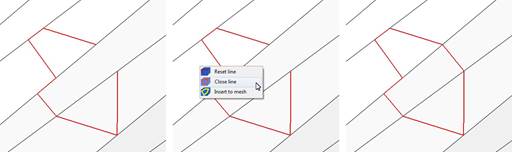
An open cut line is closed using the Close Line option.
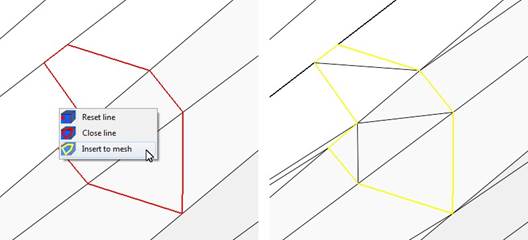
New triangle edges are inserted into the mesh along the cut line.