Let Netfabb use a part's shadow area to generate a plate on the platform surface
Baseplates provide a solid interface between the part's own support structures and the build platform. This can help with keeping a part firmly and reliably attached to the build platform during the print. Later, when the print is finished, it can also help with detaching a part from the platform since you can afford to apply greater leverage while still keeping the risk of damage to the part to a minimum.
This function determines the shadow area of an existing part and then generates a new part, or a parametric attachment, from that.
- Select the part
- From the main menu, choose
Modify >
 Generate Baseplate from Shadow.
- Adjust settings as needed, and click OK.
Errors in the original part's mesh can cause problems with plate generation, so before proceeding to do so, Netfabb will check the part for errors, including (if activated) self-intersections.
Baseplate Generation Reference
| Option | Description | |
|---|---|---|
|
Baseplate Height |
The value in Z where to terminate the plate. Effectively, the plate's thickness. |
|
|
Baseplate Type |
The plate type can be Solid, meaning a continuous, featureless plate, or be a grid of either Hexagonal or Rectangular pattern. If the build room contains another part, you can also select Custom Mesh: This applies the shadow area as a stencil to that part. (It also ignores the value given for Baseplate height.) |
|
|
Use only outer contours |
If the part's net shadow area fully encloses areas without shadow, this switch determines whether they should also be covered by the baseplate. Note: Enclosed areas are determined
before the margin is applied. This switch therefore ignores any areas that (would) become enclosed by overlapping offsets of neighboring shadow areas alone.
|
|
|
Offset from shadow |
Determines the margin to generate the contour of the baseplate. The margin is added to the shadow area of the part. |
|
|
Cell size |
Determines the length of the individual cells' inner sides. |
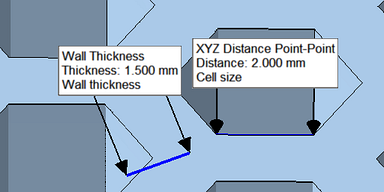 Set wall thickness and cell size to adjust the grid pattern to your needs. |
|
Wall thickness |
Adds a spacing between the cells. |
|
|
Parametric Part |
When ticked, the baseplate is generated as a parametric attachment of the parent part instead of a separate part. This means that you only need to set it up once, and it gets updated automatically (with a short delay) whenever you move, rotate, or scale the part. A parametric baseplate is only maintained for slicing, and also saved in a FABBPROJECT file. To keep the baseplate during conversions, such as moves between build rooms, or exports to other file types, (re-) generate the plate as a non-parametric part. |
|
|
Baseplate Mesh |
When the build room contains more than one part, and you select Custom Mesh for the Baseplate Type, you can select the applicable part here. |
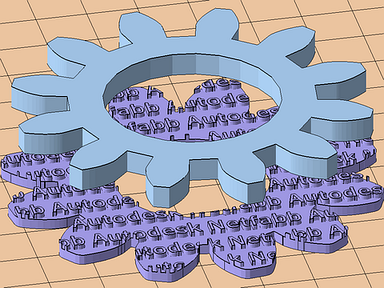 A spur gear with a baseplate stenciled from a custom mesh |
|
Check for self-intersections |
Self-intersections can affect plate generation negatively by providing "inverted contours". However, checking for them can also be computationally expensive. With this switch you have the choice of performing the check in addition to the usual part integrity check. |
|