Generate a parametric part from a mesh using the boundary representation model
When launching the BREP function on a part,
Netfabb offers to check for flaws which can cause the BREP generation to fail. If it suspects there may be such flaws, it offers to send the part to repair instead of BREPing. If you choose to forgo the repair despite
Netfabb indicating the part may be flawed, a message is posted to the display whenever entering a loaded
Mesh to BREP instance to remind you of this. To re-test, close the
 Mesh to BREP tree node on the part by clicking
 Remove Mesh to BREP and launch the command again.
Generally, we recommend to use Mesh to BREP only on sane meshes, free from mesh flaws such as self-intersections, holes, overlapping or inverted triangles, and other issues.
Mesh to BREP is a module.
- Select the part.
- From the main menu, choose
Modify >
 Mesh To BREP.
- Make adjustments as needed.
- Click Calculate.
- Click Apply to accept the result, or click Reset to return to making more adjustments.
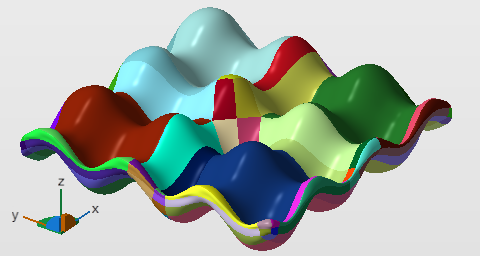
BREP patches are highlighted during the conversion
Settings Reference
Preprocessing
Preprocessing retriangulates the part surface into a more even mesh before the actual BREP generation is launched. You can choose to not do this. Depending on your choice, different preprocessing options regarding the handling of sharp corners are available:
Retriangulate input mesh disabled:
- Preserve given face groups as sharp edges: Provided the part actually has any face groups (otherwise this checkbox remains disabled), ticking this will cause the preprocessing to recognize the lines where face groups meet as sharp edges and will attempt to avoid smoothing these through the remeshing.
Retriangulate input mesh enabled:
- Target Edge Length: The remesher will try to adhere to this edge length target* but may deviate if the geometry requires it.
- Resolution: Lower values significantly increase generation of triangles and calculation times.
- Detect and preserve sharp edges and Critical angle: This is the threshold of the smaller angle between triangles forming the edge, ranging from 90 ° up to 180 °. Blunt edges of this angle or greater are smoothed. This ignores the signs of the triangles' normals, so both types of edges, concave or convex, can be addressed by this.
Surface generation
- Approximation: Sets a distance threshold for permitted deviation from the original surface
- Number of surfaces: Allows to set a target* for the amount of BREP patches to be used for surface approximation.
Display settings
- Tessellation settings: Provides selection from the Retessellation Library.
- Show triangle mesh: Switches triangle borders to be highlighted by a black line.