Functions to clean up or modify lattices using automated methods
 The menu structure has been changed, many controls have been moved to the main menu.
All of these functions create a new lattice body, so you have options available to control what to do with the old body, whether to keep it, and if so, whether to hide and to exclude from the part output.
To remove open beams automatically
When generating lattices, some junctions can end up terminating in only one single beam. To remove these junctions and beams automatically, use this function.
- In the project tree, select the lattice or surface lattice of a component.
- In the main menu, click
 Remove Open Beams.
- In the context view, adjust values as needed, including whether to keep trimming until there are no open beams left (Trim recursively) in case removing beams once would still leave open beams.
- Click Generate.
To snap two separate lattices together
Snapping lattices attempts to create beams between two individual lattice bodies to connect them into one single new lattice body.
- In the project tree, select one of the lattices or surface lattices of a component.
- In the main menu, click
 Snap to Other Lattice.
- Adjust values as needed, including selecting the right lattice from the Target lattice dropdown.
- Click Generate.
To add a thickness gradient
A thickness gradient makes beams across a span of lattice progressively thicker or thinner. You can provide XYZ coordinates for each of the beginning (highlighted with a red plane) and the end (yellow plane) of the gradient, or use the gizmos in the display.
- In the project tree, select one of the lattices or surface lattices of a component.
- In the main menu, click
 Apply Thickness Gradient.
- Adjust values as needed, including selecting the right lattice from the Target lattice dropdown.
- Click Generate.
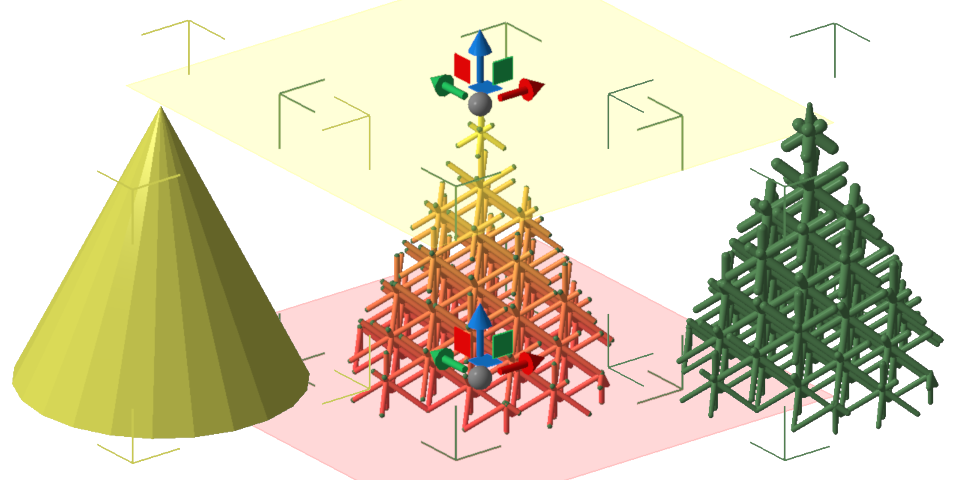
Three steps of creating a thickness gradient. From left: The original body, its lattice with the gradient being set up, the finished lattice with gradient.