Add and modify color information to triangles and meshes
Colors can be used to organize parts for production or to preview what the produced color part will look like. There are multiple ways to add color to a part.
Paint on triangles
Painting on individual triangles allows you to apply colors to individual elements of the mesh.
- Select the part.
- Click
Modify >
 Texture & Color Mesh.
- From the toolbar, click
 Paint on Triangles.
- In the context area, click the color bar and select your color of choice.
- Enable the Show Triangles check box to visualize the mesh.
- Click individual triangles to set their color.
- Click Apply Changes to apply the color to the part.

Left: A few colored triangles are missing. Right: The part was improved by painting on triangles.
Paint on surfaces
Painting on surfaces allows you to apply colors to multiple triangles at once using a brush you can adjust in size.
- Select the part.
- Click
Modify > Texture & Color Mesh.
- From the toolbar, click
 Paint on Surfaces.
- In the context area, click the color bar and select your color of choice.
- Adjust the
Radius of the brush to control how large of an area is colored.
Tip: Hold Ctrl and use the mouse scroll wheel to change the radius.
- Adjust the Selection Tolerance to control what areas of the part can be colored as governed by the threshold angle.
- Enable the Colorgradient on Border check box to apply a color fading effect at the edges of the selected elements.
- Enable the Paint over Texture check box to allow the paint to be applied to a texture.
- Paint the part with color as needed.
- Click Apply Changes to apply the color to the part.
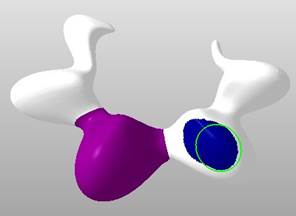
Painting on surfaces.
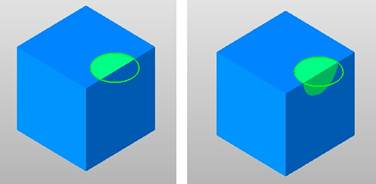
Left: A selection tolerance below 90°. Right: A selection tolerance above 90° and the brush now covers the adjacent side of the box.
Paint on shells
Painting on shells allows you to apply color to an entire mesh.
- Select the part.
- Click
Modify > Texture & Color Mesh.
- From the toolbar, click
 Paint on Shells.
- In the context area, click the color bar and select your color of choice.
- Enable the Colorgradient on Border check box to apply a color fading effect at the edges of the shell.
- Enable the Paint over Texture check box to allow the paint to be applied to a texture.
- In the display, click the shells to be colored.
- Click Apply Changes to apply the color to the part.
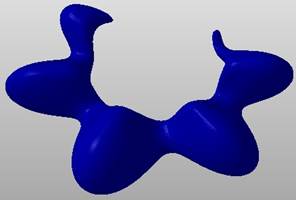
Painting on shells
Read color from triangle
Reading a color from a triangle allows you to apply a color that already exists elsewhere on the part.
- Select the part.
- Click
Modify > Texture & Color Mesh.
- From the toolbar, click
 Read Color from Triangle.
- Click a triangle on the part which contains the color you wish to read. After you click the triangle, the color bar is updated with this color.
- Now you can apply this color to the part with the
Paint on Triangles,
Paint on Surfaces, or
Paint on Shells methods.