The New Analysis form is shown below.
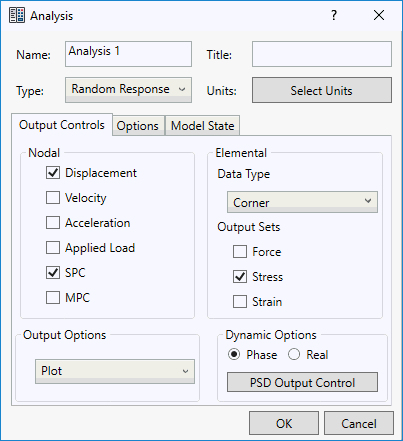
Name: Enter a name for the new analysis.
Title: Enter additional comments about the analysis, such as a brief description.
Type: Currently, the following analysis types are supported:
- Linear Static
- Normal Modes
- Linear Buckling
- Prestress Static
- Prestress Normal Modes
- Nonlinear Static
- Nonlinear Buckling
- Direct Transient Response
- Modal Transient Response
- Impact Analysis
- Nonlinear Transient Response
- Direct Frequency Response
- Modal Frequency Response
- Random Response
- Shock/Response Spectrum
- Multi-Axial Fatigue
- Vibration Fatigue
- Linear Steady State Heat Transfer
- Nonlinear Steady State Heat Transfer
- Nonlinear Transient Heat Transfer
- Explicit Dynamics
- Explicit Quasi-Static
Select Units: Autodesk Inventor Nastran allows you to choose the units of analysis at two different levels:
- CAD Model: This setting uses whatever units you select in the CAD Model.
- Other units systems available are SI, Modified SI and English.
- If the units are modified inside the analysis, then this setting overrides Inventor Nastran, Format, and then Units for the analysis.
- If the model has multiple analyses, a different unit system can be selected per analysis.
- This only applies to the Nastran Bulk Data file that is written out. The user will not see a difference in the numbers entered in the user interface.
Nodal Output Control:
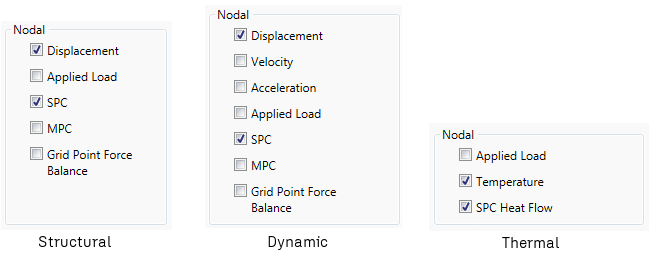
- Displacement: Controls nodal displacement output.
- Velocity: Controls nodal velocity output.
- Acceleration: Controls nodal acceleration output.
- Applied Load: Controls nodal applied load output.
- Single Point Constraint (SPC): Controls nodal single point constraint output.
- Multipoint Constraint Force (MPC): Controls nodal multipoint constraint output.
- Grid Point Force Balance: Controls grid point force output.
- Temperature: Controls temperature distribution output.
- SPC Heat Flow: Controls single point heat flow output.
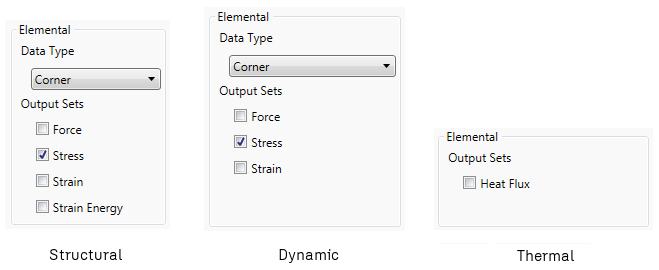
Elemental Output Control:
-
Data Type:
- Corner: Controls whether or not corner data will be generated from the Nastran solution.
- Centroidal: Controls whether or not centroidal data will be generated from the Nastran solution.
-
Output Sets:
- Force: Controls elemental force output.
- Stress: Controls elemental stress output.
- Strain: Controls elemental strain output.
- Strain Energy: Controls elemental strain output.
- Heat Flux: Controls elemental heat flux output.
Dynamic Options:
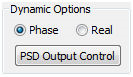
- Phase: For Frequency Response solutions, this option will appear as a choice for Magnitude and Phase output.
- Real: For Frequency Response solutions, this option will appear as a choice Real and Imaginary output.
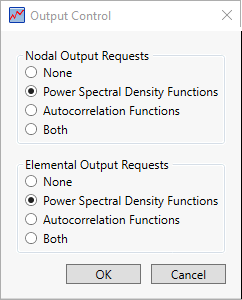
- PSD Output Control: For Random Response/Vibration Fatigue solutions, this option will appear as a nodal and elemental output.
Output Options:
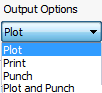
- Plot: Result output only to the results neutral file system.
- Print: Result output to both the model results output file and the results neutral file system.
- Punch: Result output additionally to the model results punch file.
- Plot and Punch: Result output to both the model results output file, the results neutral file system and the model results punch file.
Contact Data: Allows you to set the default settings for generating Automatic contacts in Autodesk Inventor.
Options Tab
Fields on this tab vary somewhat, depending on the analysis type.
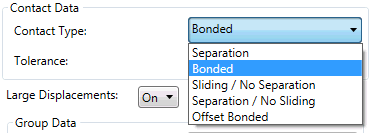
- Contact Type: Separation, Bonded, Sliding/No Separation, Separation/No Sliding, and Offset Bonded are available to define automatic contacts using the CAD Model.
- Tolerance: It allows you to generate automatic contacts using the faces which are within the specified tolerance.
Large Displacements:
- On: Large displacement, follower force effects, and differential stiffness will be included for nonlinear analyses.
- OFF: Large displacement, follower force effects, and differential stiffness will not be included for nonlinear analyses.
Spectrum Data applies only to Shock/Response Spectrum analysis.
- Structural Response: Select On or Off to specify whether the analysis will include structural response.
- Summation Option:Select the method to use for summing responses: Absolute (ABS), Square Root of Summation of Squares (SRSS), Naval Research Lab (NRL), or Complete Quadratic Combination (CQC).
- Lower Frequency: The lowest frequency to analyse.
- Weight Mass Scaling Factor: Specify this factor if material density is input in weight units and must be converted to mass units.
Model State Tab
Choose a model Representation defined in Inventor as the basis of your analysis model.
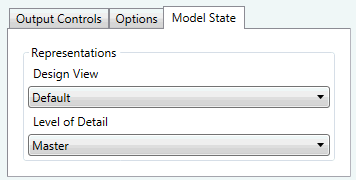
- Design View: You create a Design View in the Inventor assembly environment to preserve a designated representation view of assembly components. In these views, some assembly components are not visible, if they are not needed for a particular view and analysis.
- Level of Detail: You create a Level of Detail in the Inventor assembly environment to simplify a model by suppressing unnecessary components. You can also use levels of detail to combine parts of an assembly into a single part representation.
 The tutorials in this guide cover the analysis types supported.