Using Controllers
Get information on using controllers in a VRED collaboration session.
Since not all controllers have buttons in the same location, when in VR, there is a controller mode with displayed tooltips. Use the tooltips to locate tools.
For entering a collaboration session, two controllers are required.
For a list of supported VR devices, see VR Requirements.
What Tools Do the Controllers Have
For the location of these tools, please refer to these images:
HTC Vive, StarVR, and VRHero/VRgineers XTAL

Oculus Rift

WinMR
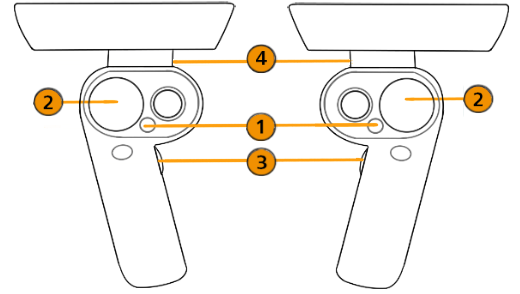
Logitech VR Ink

 VR Menu / Tools Menu
 Teleport
 Tooltips
 Pointer
VR Menu
Press this button to display the VR Menu or hide it. See VR Menu for more information.
Teleport
Use to teleport yourself to different places in a scene by touching the controller pad to cast a teleport arc, then pressing the pad to teleport. Teleport to different locations in the scene, into a car, or onto a car. See Teleporting for more information.
Tooltips
Press this button to turn the displayed controller tooltips on or off.
Pointer
Press this to activate a beam and use it to point and indicate areas of interest.
Custom Controls
Use the following Python functions to switch the mapped interaction of the trigger and touchpad/thumbstick.
In vrImmersiveInteractionService, use setControlMode(ControlMode)
For ControlMode, you can use TriggerPointer or ButtonPointer.
For example, for the Vive controller, if you wanted the touchpad/thumbstick to be mapped to the pointer and the trigger to be teleport, you would use:
setControlMode(ButtonPointer) and setControlMode(TriggerTeleport).
See Working with Controllers and Trackers for how to get a VR device, attach geometry to it, and set virtual buttons on touchpads using Python.