The IFC - MVD format is a specific output developed for the U.S. market, by AISC in collaboration with GeorgiaTech and is intended to deliver information from steel detailing software to CNC machines.
About the IFC - AISC MVD EM.11 format
- IFC - AISC Steel Detailing MVD format:
The function of the model is to provide enough detailed information about the steel members to enable the fabricator to manufacture the steel pieces. The model is the finalized version of the "Advanced Steel Detailing Model" which is provided as the output of any modification and integration of the final detailing model.
The exchange model includes all the finalized information of the "Advanced Steel Detailing Model", for all main and minor members, such as the member ID and member properties (section size, grade, length), detailed welding and bolting information, information about holes and member camber, etc.
The IFC - MVD format is a specific output developed for the U.S. market, by AISC in collaboration with GeorgiaTech, intended to deliver information from steel detailing software to CNC machines, in order to enhance the fabrication process and deliver a standardized format that can be understood by both the software exporting it and the CNC machines.
The format output is based on the IFC 2x3 scheme definition.
This implementation is based on the current requirements for export, and includes the following:
- Beams:
- With features
- With mirror
- Any shape:
- Standard shapes are defined through parameterized IFCSHAPEDEFINITION.
- User shapes or non-standard Advance Steel shapes are defined as IFCARBITRARYPROFILE.
- All the required AISC_EM11_Pset attributes.
- Beams have a ProfileMap that allows sharing of identical shape definition for multiple beams that have the same section class and section name.
- Plates:
- With features
Note: Corner cuts are not exported as cuts (VOIDS), instead they are included in the plate outer shape, inside the IFCPLATE extrusion definition.
- Any shape through Polylines/TrimmedCurve + extrusion.
- With features
- Beam and plate special classification:
- Horizontal beams are always IFCBEAM.
- Vertical beams are always IFCCOLUMN.
- Skewed beams are IFCMEMBER.
- Plates and beams that are attached parts in assemblies are IFCDISCRETEACCESORY.
- Fasteners:
- Welds as fasteners
- Bolts as mechanical fasteners
- All the required ISC_EM11_Pset attributes
- Compound beams:
- Components of a compound beam are exported as individual objects connected through an assembly.
- Assemblies
- Folded beams and folded plates are out of scope for IFC MVD - no export is done.
- Shear studs are out of scope for IFC MVD - no export is done.
- Anchors are out of scope for IFC MVD - they are exported as bolts, but without many references.
- Tapered beams / compounds - Compounds are not IFC native entities. Currently, Advance Steel exports compounds / tapered beams as individual elements gathered in an assembly (which is the compound element). Tapered beams make no exception, even though, due to the fact that folded plates are out of scope, the tapered beam will miss parts if those parts are folded plates.
GUI and commands used by the IFC export feature
To access the IFC export:
Click Export & Import tab  Exchange formats panel
 (Export IFC).
A dialog appears, where you can choose between the Advance Steel IFC export (which uses a Generic IFC2x3 schema) and the IFC MVD EM.11 export.
This is done from the Standard category. By default, the dialog has the Export IFC2x3 option checked and it remains as default even after a successful export with the Export IFC MVD.11 option.
The default path filled in the dialog is the same path as the one where the model is saved. The model needs to be saved first for the export to be successfully performed. The export path can be changed to any other location on the disk, by using the button on the right side of the path field.
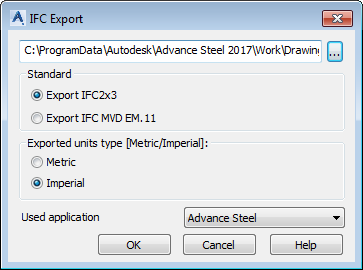
In this dialog you can also select the units used during Export (metric or imperial). The default value checked in the dialog is based on the length units in the Advance Steel model from which the export is done. Therefore, if the length units in the model are set on millimeters, then the metric box will be checked as default. For all other length unit settings (including inch or feet length unit settings) the imperial option will be set as default.
When exporting in metric, the units used to describe length values in the IFC will be millimeters. As for imperial, the units used inside the IFC will be decimal inch (e.g. 1 ½ "= 1.5).
The Used application field is NOT used by the IFC MVD export, as the new export does not use any type of mapping when outputting Advance Steel profiles.
To perform the export, click OK.
Once the export is finished, the program will output a report in the command line, containing the amount of objects written in the IFC file. The report will contain 1, 2, 3 or 4 lines (each line is demanded only if IFC exports at least one of the following object types: Beam, Plate, Bolt or Weld), and the sorting will always be the same.

The IFC MVD export can be performed on:
- The entire model. If no objects are selected when the Export IFC command is used, the export will be automatically performed on the entire model.
- Selected objects. You can preselect objects from the model using any method (individual selection or using Advance Steel queries / groups) and then using the Export IFC command.
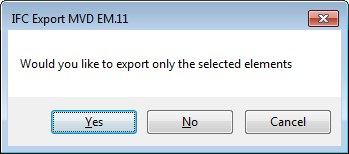
If a preselection is used, the Export IFC MVD command will display a message once using OK to initiate export, mentioning that the selection is done and giving the following options:
- Yes - only the selected objects are exported.
- No - the entire model is exported.
- Cancel - cancels the export command.