Export model information from Advance Steel to FabTrol using the special SFR (Structural Fabrication Report) export format.
You can share model information between the software and the shop by easily exporting drawing lists, drawing revision lists and assembly part lists in the form of text files with the .sfr extension. The .sfr format allows the file import into AVEVA FabTrol.
To export SFR:
- Go to the Export & Import tab
 Exchange formats panel and click
 (Export SFR).
- The SFR Export dialog appears. In this dialog, select one or more options to export:
- Assembly Part List - This file contains all the assembly/part information, but no information related to the drawings.
- Drawing List - This file contains the information about the drawings that exist in the model.
- Drawing Revision List - This file contains the drawing revision information for the drawings that exist in the model.
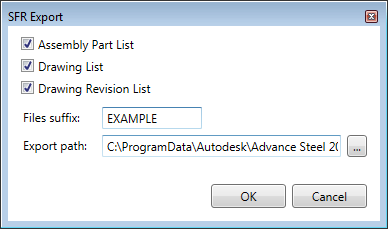
- Browse for the location you want to export the files to in the Export path field.
- Optionally, you can enter an additional name for the files in the Files suffix field.
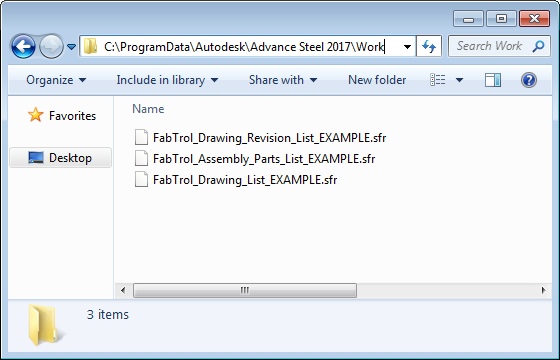
Note: By default, the names of the three available exported files are FabTrol_Assembly_Parts_List.sfr, FabTrol_Drawing_List.sfr and FabTrol_Drawing_Revision_List.sfr. The text entered in the Files suffix filed will show up after the default name. E.g. FabTrol_Drawing_Revision_List_EXAMPLE.
- The files are saved in the location you chose at step 3.