The automatic ordering of operations determined the order by a set of rules. You can also specify an exact ordering of operations manually.
- Select the Manual Ordering option on the Op List tab.
- In the Fixed Operation Ordering dialog, select Do Not Show This Warning Again, and click OK.
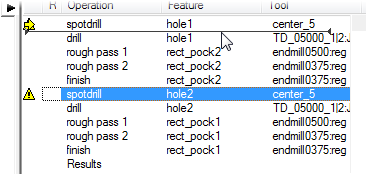
- Select the
spotdrill operation for
hole2 from the list, and drag it up ahead of the
drill operation for
hole1.
- Simulate the part.
- In the
Simulation toolbar, click
Play
 . The simulation performs the operations in the new order.
- Click
Stop
 to end the simulation.
- In the
Simulation toolbar, click
Play
- Selecting Automatic Ordering to return to automatic ordering.
- Click OK to close the Automatic Operation Ordering dialog.