Viewport Shading Settings
The following method exposed by the MaxOps struct in 3ds Max 2010 and higher returns a ViewportShadingSettings object which in turn provides interfaces to control some advanced viewport settings including Soft Shadows, Ambient Occlusion and Exposure Control preview.
In 3ds Max 2012, these settings apply to the Direct3D driver. When running the Nitrous Graphics Manager, most of these properties and methods will have no effect, for example the property .ActivateViewportShading documented below will return true when the viewport is set to "Realistic" mode, but setting the property to false will have no effect on the viewport mode or on the value of the property.
<IObject>maxops.getViewportShadingSettings() Returns an <IObject:ViewportShadingSettings> object exposing several interfaces related to advanced viewport shading controls.
EXAMPLE:
   vss = maxops.getViewportShadingSettings()
   --> <IObject:ViewportShadingSettings>
   showInterfaces vss
Interface: ViewportBasicSettings Properties:
IObject:ViewportShadingSettings>.ActivateViewportShading: boolean : Read|Write Get/set the state of the Enable Hardware Shading checkbox in the Lighting and Shadows tab of the Viewport Configuration dialog.
Set to true to enable hardware shading, set to false to disable it.
This is equivalent to IViewportShadingMgr.ShadingLimit=#None
IObject:ViewportShadingSettings>.ShadingQuality: enum : Read|Write
ShadingQuality enums: {#Good|#Best}
Get/set the state of the Quality/Hardware Support radio buttons in the Global Settings group of controls in the Lighting and Shadows tab of the Viewport Configuration dialog.
These are equivalent to
IViewportShadingMgr.ShadingLimit=#Good and
IViewportShadingMgr.ShadingLimit=#Best EXAMPLE:
   vss = maxops.getViewportShadingSettings()
   --><IObject:ViewportShadingSettings>
   vss.ActivateViewportShading
   -->false
   vss.ActivateViewportShading = true
   -->true
IObject:ViewportShadingSettings>.ShadowsActive: boolean : Read|Write Get/set the state of the Enable Shadows checkbox in the Shadow Options group of controls in the Lighting and Shadows tab of the Viewport Configuration dialog.
IObject:ViewportShadingSettings>.TonemappingActive: boolean : Read|Write Get/set the state of the Enable Exposure Control in Viewport checkbox in the Lighting and Shadows tab of the Viewport Configuration dialog.
When set to true, the Exposure Control will be applied to the viewport.
When set to false, it will be applied only to the final rendering.
Interface: ViewportGISettings Properties:
Ambient Occlusion
 <IObject:ViewportShadingSettings>.AmbientOcclusionMode : enum : Read|Write

AmbientOcclusionMode enums: {#GIOff|#AOOnly|#AOComposite}
Get/set the Viewport Ambient Occlusion mode.
The Lighting and Shadows tab of the Viewport Configuration dialog exposes only a checkbox which corresponds to #GIOff when the checkbox is unchecked and #AOComposite when the checkbox is checked. Zero-based integers can be used in place of the enums.
Possible numeric or enum values are:
0 (#GIOff) - No Global Illumination.
1 (#AOOnly) - Only Ambient Occlusion, black and white with no other shading.
2 (#AOComposite) - Ambient Occlusion composited over the shaded scene.
<IObject:ViewportShadingSettings>.AmbientOcclusionQuality: enum : Read|Write

AmbientOcclusionQuality enums: {#Low|#Medium|#High}
Get/set the Viewport Ambient Occlusion quality.
Possible numeric or enum values are:
0 (#Low) - 16 sample points
1 (#Medium) - 32 sample points
2 (#High) - 64 sample points
<IObject:ViewportShadingSettings>.AmbientOcclusionRadius: float : Read|Write Get/set the Ambient Occlusion sample radius value.
<IObject:ViewportShadingSettings>.AmbientOcclusionStrength: float : Read|Write Get/set the Ambient Occlusion strength value. It controls the intensity of the effect. Effective range is from 0.0 to 1.0.
Indirect Lighting (Unsupported)
<IObject:ViewportShadingSettings>.IndirectLightingMode: enum : Read|Write

IndirectLightingMode enums: {#ILOff|#ILOnly|#ILAOComposite}
Get/set the Indirect Illumination mode.
Possible numeric or enum values are:
0 (#ILOff) - No Indirect Lighting (default)
1 (#ILOnly) - Only the Indirect Lighting effect will be used.
2 (#ILAOComposite) - Indirect Lighting and Ambient Occlusion Composite mode.
<IObject:ViewportShadingSettings>.IndirectLightingQuality: enum : Read|Write

IndirectLightingQuality enums: {#Low|#Medium|#High}
Get/set the Indirect Lighting quality.
Possible numeric or enum values are:
0 (#Low) - 16 sample points
1 (#Medium) - 32 sample points (default)
2 (#High) - 64 sample points
<IObject:ViewportShadingSettings>.IndirectLightingRadius: float : Read|Write Get/set the Indirect Lighting radius value.
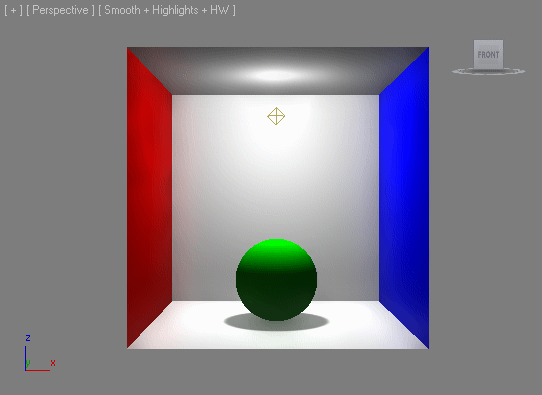
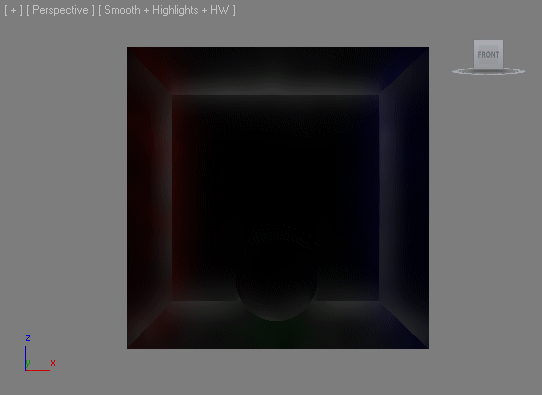
CORNELL BOX EXAMPLE:
   resetMaxFile #noPrompt
   viewport.setTM (matrix3 [1,0,0] [0,0,-1] [0,1,0] [6,-150,-800])
   bx = box width:300 height:300 length:300 backfacecull:true
   addModifier bx (normalModifier flip:true)
   mtl = multiMaterial numsubs:6
   mtlred = standard diffusecolor:red
   mtlblue = standard diffusecolor:blue
   mtlwht = standard diffusecolor:white
   mtl.materialList = #(mtlwht,mtlwht,mtlred,mtlblue,mtlwht,mtlwht)
   bx.material = mtl
   om = omniLight pos:[0,0,250] rgb:white shadowMultiplier:0.5
   om.baseobject.castshadows = true
   sph = sphere radius:50 pos:[0,0,50] segs:32
   sph.material = standard diffusecolor:green selfillumamount:15.0
   vss = maxops.getViewportShadingSettings()
   vss.ActivateViewportShading = true
   vss.ShadowsActive = true
   vss.IndirectLightingRadius = 200
   vss.IndirectLightingQuality = #medium
   vss.IndirectLightingMode = #ILAOComposite
RESULT:
vss.IndirectLightingMode = #ILOnlyRESULT (Indirect Lighting Only)
Depth Of Field (Unsupported)
<IObject:ViewportShadingSettings>.DepthOfFieldActive: boolean : Read|Write Get/set the Depth Of Field enabled state.
<IObject:ViewportShadingSettings>.DepthOfFieldNearPlane: float : Read|Write Get/set the Depth Of Field Near Plane value.
<IObject:ViewportShadingSettings>.DepthOfFieldFarPlane: float : Read|Write Get/set the Depth Of Field Far Plane value.
<IObject:ViewportShadingSettings>.DepthOfFieldFocusPlane: float : Read|Write Get/set the Depth Of Field Focus Plane value.
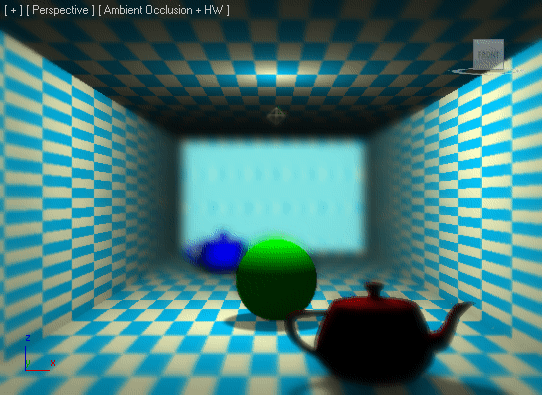
DOF BOX EXAMPLE:
   resetMaxFile #noPrompt
   viewport.setTM (matrix3 [1,0,0] [0,0,-1] [0,1,0] [6,-150,-800])
   bx = box width:500 height:300 length:2000 backfacecull:true
   addModifier bx (normalModifier flip:true)
   mp1 = checker color1:[0,200,255] color2:[255,255,200]
   mp1.coords.U_Tiling = 10
   mp1.coords.V_Tiling = 10
   bx.material = standard diffusecolor:white diffusemap:mp1
   showTextureMap bx.material mp1 true
   om = omniLight pos:[0,0,250] rgb:white shadowMultiplier:0.5
   om.baseobject.castshadows = true
   sph = sphere radius:50 pos:[0,0,50] segs:32
   sph.material = standard diffusecolor:green selfillumamount:15.0
   tp1 = teapot radius:50 pos:[80,-250,0]
   tp1.material = standard diffusecolor:red
   tp2 = teapot radius:50 pos:[-100,500,0]
   tp2.material = standard diffusecolor:blue
   vss = maxops.getViewportShadingSettings()
   vss.ActivateViewportShading = true
   vss.ShadowsActive = true
   vss.ShadowMode = #Soft
   vss.AmbientOcclusionMode = #AOComposite
   vss.DepthOfFieldActive = true
   vss.DepthOfFieldNearPlane = 300
   vss.DepthOfFieldFarPlane = 1500
   vss.DepthOfFieldFocusPlane = 800
RESULT:
Interface: ViewportShadowSettings Properties:
<IObject:ViewportShadingSettings>.ShadowMode: enum : Read|Write
ShadowMode enums: {#Hard|#Soft}
Get/set the state of the Hard/Soft Shadow radio buttons in the Shadow Options group of controls in the Lighting and Shadows tab of the Viewport Configuration dialog.
When set to #Hard , the shadows will be drawn in the original mode introduced in 3ds Max 2008.
When set to #Soft , the soft shadows mode introduced in 3ds Max 2010 will be used instead.
VIEWPORT SHADING EXPLORER SCRIPT:
   macroScript ViewportShadingExplorer category:"MAXScript Help"
   (
   global Viewport_Shading_Explorer_Dialog
   try(destroyDialog Viewport_Shading_Explorer_Dialog)catch()
   rollout Viewport_Shading_Explorer_Dialog "Viewport Shading Explorer"
   (
   local vss = maxops.getViewportShadingSettings()
   group "Hardware Shading"
   (
   checkbox chk_ActivateViewportShading "Activate Viewport Shading "checked:vss.ActivateViewportShading
   dropdownlist ddl_ShadingQuality items:#("Good Quality", "Best Quality") selection: (findItem #(#Good, #Best) vss.ShadingQuality)
   checkbox chk_TonemappingActive "Exposure Control In Viewport" checked:vss.TonemappingActive
   )
   group "Shadows"
   (
   checkbox chk_ShadowsActive "Shadows Active" checked:vss.ShadowsActive
   dropdownlist ddl_ShadowMode items:#("Hard Shadows","Soft Shadows") selection:(if vss.ShadowMode == #Hard then 1 else 2)
   )
   group "Soft and Area Shadows"
   (
   spinner spn_CubeBias "Cube Bias" range:[0,1000,ViewportSSB.CubeBias] fieldwidth:50
   spinner spn_ShadowMapSize "Shadow Map Size (2^N)" range:[1,10,sqrt ViewportSSB.ShadowMapSize] type:#integer fieldwidth:50
   checkbox chk_AreaShadow "Area Shadow" checked:ViewportSSB.AreaShadow
   checkbox chk_TransAreaShadow "Transparent Area Shadow" checked:ViewportSSB.TransAreaShadow
   )
   group "Ambient Occlusion"
   (
   dropdownlist ddl_AmbientOcclusionMode items:#("Ambient Occlusion Off","Ambient Occlusion Only", "Ambient Occlusion Composite") selection:(findItem #(#AOOff,#AOOnly,#AOComposite) vss.AmbientOcclusionMode )
   dropdownlist ddl_AmbientOcclusionQuality items:#("Low Quality","Medium Quality", "High Quality") selection:(findItem #(#Low,#Medium,#High) vss.AmbientOcclusionQuality )
   spinner spn_AmbientOcclusionRadius "Sample Radius:" range:[0,1000,vss.AmbientOcclusionRadius] fieldwidth:50
   spinner spn_AmbientOcclusionStrength "Strength:" range:[0,1000,vss.AmbientOcclusionStrength] fieldwidth:50
   )
   group "Indirect Lighting"
   (
   dropdownlist ddl_IndirectLightingMode items:#("Indirect Lighting Off","Indirect Lighting Only", "Indirect Lighting AO Composite") selection:(findItem #(#ILOff,#ILOnly,#ILAOComposite) vss.IndirectLightingMode )
   dropdownlist ddl_IndirectLightingQuality items:#("Low Quality","Medium Quality", "High Quality") selection:(findItem #(#Low,#Medium,#High) vss.IndirectLightingQuality )
   spinner spn_IndirectLightingRadius "Sample Radius:" range:[0,1000,vss.IndirectLightingRadius] fieldwidth:50
   )
   group "Depth Of Field"
   (
   checkbox chk_DepthOfFieldActive "Depth Of Field Active" checked:vss.DepthOfFieldActive
   spinner spn_DepthOfFieldNearPlane "Near Plane" range:[0,10000000,vss.DepthOfFieldNearPlane] fieldwidth:50
   spinner spn_DepthOfFieldFarPlane "Far Plane" range:[0,10000000,vss.DepthOfFieldFarPlane] fieldwidth:50
   spinner spn_DepthOfFieldFocusPlane "Focus Plane" range:[0,10000000,vss.DepthOfFieldFocusPlane] fieldwidth:50
   )
   on chk_ActivateViewportShading changed state do
   vss.ActivateViewportShading = state
   on ddl_ShadingQuality selected itm do
   vss.ShadingQuality = (#(#Good, #Best))[itm]
   on chk_TonemappingActive changed state do
   vss.TonemappingActive = state
   on chk_ShadowsActive changed state do
   vss.ShadowsActive = state
   on ddl_ShadowMode selected itm do
   vss.ShadowMode = (#(#Hard, #Soft))[itm]
   on spn_CubeBias changed val do
   ViewportSSB.CubeBias = val
   on spn_ShadowMapSize changed val do
   ViewportSSB.ShadowMapSize = 2^val
   on chk_AreaShadow changed state do
   ViewportSSB.AreaShadow = state
   on chk_TransAreaShadow changed state do
   ViewportSSB.TransAreaShadow = state
   on ddl_AmbientOcclusionMode selected itm do
   vss.AmbientOcclusionMode = (#(#AOOff,#AOOnly,#AOComposite))[itm]
   on ddl_AmbientOcclusionQuality selected itm do
   vss.AmbientOcclusionQuality = (#(#Low,#Medium,#High))[itm]
   on spn_AmbientOcclusionRadius changed val do
   vss.AmbientOcclusionRadius = val
   on spn_AmbientOcclusionStrength changed val do
   vss.AmbientOcclusionStrength = val
   on ddl_IndirectLightingMode selected itm do
   vss.IndirectLightingMode = (#(#ILOff,#ILOnly,#ILAOComposite))[itm]
   on ddl_IndirectLightingQuality selected itm do
   vss.IndirectLightingQuality = (#(#Low,#Medium,#High))[itm]
   on spn_IndirectLightingRadius changed val do
   vss.IndirectLightingRadius = val
   on chk_DepthOfFieldActive changed state do
   vss.DepthOfFieldActive = state
   on spn_DepthOfFieldNearPlane changed val do
   vss.DepthOfFieldNearPlane = val
   on spn_DepthOfFieldFarPlane changed val do
   vss.DepthOfFieldFarPlane = val
   on spn_DepthOfFieldFocusPlane changed val do
   vss.DepthOfFieldFocusPlane = val
   )
   createDialog Viewport_Shading_Explorer_Dialog 200 605
   )