Windows Installation
Autodesk Moldflow Synergy - User Interface and Autodesk Moldflow Insight - Solvers both use an installation Wizard to guide you through the installation process.
To complete the installation, you must install both applications: Autodesk Moldflow Synergy - User Interface and Autodesk Moldflow Insight - Solvers.
and install it onto your computer into a folder of your choice. By default the help is installed in:
C:\ProgramData\Autodesk\Autodesk Moldflow Synergy 2021\help
Once the offline help is installed on your computer, point the Help system to Use Local Help.
Known issues
When you install on a Windows 8.1 platform, you may see the following error message:
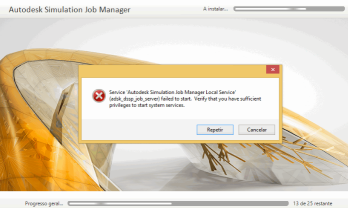
To resolve this problem, install the following Windows updates in the following order:
- clearcompressionflag.exe
- KB2919355
- KB2932046
- KB2959977
- KB2937592
- KB2938439
- KB2934018
If KB2919355 fails to install, install KB2919442 first, then try again with KB2919355 and the rest of the updates in the list.
.Net 4.7
.Net 4.7 is critical for the operation of the Autodesk Moldflow product.
Failure of the .Net 4.7 installation will cause the Autodesk Moldflow installation to fail. Update the Windows installation, then reinstall Autodesk Moldflow product.
If .Net 4.7 was not previously installed on your machine, reboot the machine prior to running your Autodesk Moldflow product.