Export CAD model in STEP ((*.tp) format
The number of file formats to which you can export CAD models has been increased to include the STEP (*.stp) file format.
In previous releases you could export CAD models to SAT v7 or SMT/SMB file format. With the 2017.3 release you can also export your CAD model as a STEP file. However, unlike when you export your CAD model to SMT/SMB format, when you export your CAD model to STEP, it is saved a single file. If you have added multiple CAD components to your model assembly, when you export them, they will be grouped together and save as one STEP file.
- Ensure the relevant CAD bodies are be visible.
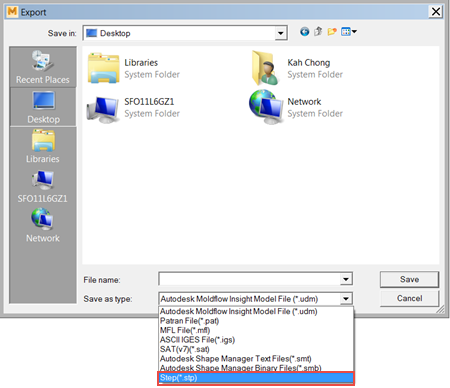
Geometry transformation you perform on the CAD bodies in Synergy, is preserved. When you open the saved STEP file in your CAD application, it will have the same layout or positioning as it had in Synergy.
Limitations
The layer name, and any custom colors that you have assigned in the layers are not preserved