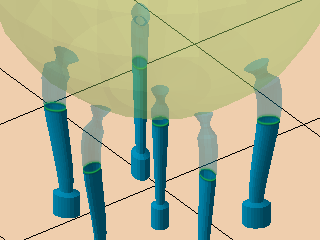
Bar supports connect two points, one on the part, and the other one either somewhere else on the same or a different part or on the platform. As such, bars only support single points. Bars may be created as volume-less single-path entities or solid voluminous ones. Bars may also be connected into bouquets that merge multiple bars into tree-like structures which terminate in single trunks at their bottom end.
| Bar contour | Notes | |
|---|---|---|
|
Bar contour |
The type of cross-section the bar support should have. |
|
|
Polygon corner |
Determines the number of corners for the solid bar. The more corners, the more rounded the bar's cross section becomes. |
|
|
Angle at top |
When set beyond 0, a pointy end is added to the normally blunt end that terminates evenly in the part surface.
Note: This point intrudes into the part mesh, so you may want to also work with
Distance to part to reduce or avoid unwanted duplication of toolpath at the intersection.
|
|
|
Crosswidth |
Determines the thickness of the contours for the solid cross. |
0.01-20.00 mm |
|
Radial type |
Used to create solid bars with oval cross-sections. It aligns the oval cross section by the semi-major axis with either X or Y axis, or radially away from the supported object's outbox's center:
|
|
|
Radial factor |
Used to create solid bars with oval cross-sections. Makes the semi-major axis as long as the semi-minor axis times this factor. |
|
|
Hatch angle |
Determines the direction of hatch-type bar support. A direction of 0 ° aligns the ribbon-like bars parallel to the Y axis, and higher values rotate this direction clockwise. |
|
|
Distance to part |
Defines the distance between part and support. A negative value makes supports intrude into the part mesh. You can use this in conjunction with Angle at top to achieve a calculated contact patch, for instance. To calculate the appropriate value, use this simple trigonometry formula: Distance to part (negative) = (desired spot diameter - Width on end) * (Breaking point width - Width on end) / Height on end |
|
|
Width on part |
Determines a separate contour width for (upper) bar ends that terminate on a part surface. |
|
|
Width on top-side part |
Determines a separate contour width for bar ends that terminate on a part surface at their lower end. |
This is optional. To disable defining a separate width for the lower end of a bar, set this to -1. |
|
Width on upper free anchor |
Bars where the upper anchors are not generated on part surface or are part of bouquets are this wide at their upper end. Used for the individual bars in Adaptive Lattice support, for example; otherwise has no effect. |
This is optional. To disable defining a separate width for the lower end of a bar, set this to -1. |
|
Width on platform |
Determines the contour width for bar ends that terminate on the build platform surface. |
|
| Breaking point |
Generates a section where the bar narrows and expands to create a defined breaking point near the part surface, making it easier to remove supports from the part later on. |
Notes |
|
Breaking point |
Toggles creation of breaking points. |
|
|
Breaking point width |
Defines the diameter of the bar at the breaking point. |
|
|
Width on end |
Determines the diameter of the bar past the breaking point where it attaches to the part surface. |
|
|
Breaking point height |
Determines the length of the breaking point itself. |
|
|
Height on start |
Determines the length over which the breaking point reduces to its narrowest point. |
|
|
Height on end |
Determines the length over which the bar should narrow towards the breaking point, as seen from the part surface. | |
|
Right angle on part |
Determines whether bars should have a small curve to terminate in a right angle at the supported surface, rather than terminating at whatever angle they would otherwise do. |
|
|
Distance to right angle |
Determines the distance away from the supported surface after which the bar should start to curve towards the other end. |
|
|
Smoothing distance |
Determines the length of subdivisions that form the curve. The shorter the section, the finer the curve is resolved, resulting in a smoother transition but also increased triangle count. |
|
| Pad on platform |
A pad is a widened cross section at the platform end of a bar support to reinforce adhesion to the platform surface |
Notes |
|
Pad on platform |
Toggles pad creation. |
|
|
Pad width |
Determines the width of the created pad. |
|
|
Pad height |
Determines the height of the created pad. |
|
|
Use density map |
Applies information provided by a 3D heatmap to lighten or strengthen structures locally. |