Use the Stress Linearization utility to graph specified stress tensors along a Stress Classification Line (SCL) that you define. The stress tensor directions are based on a local coordinate system dictated by the two endpoints of the SCL and a third point that you specify. In addition, the Stress Linearization utility determines the primary membrane stress (Pm) and primary bending stress (Pb) that comprise the total stress (Pm + Pb).
Stress Linearization is used to comply with design codes and requirements of the pressure vessel industry. However, the utility is applicable to other objects. You can use the Stress Linearization utility to graph local stress tensors along a linear path and/or to determine the relative contributions of bending and membrane stress for any type of structure.
There are two different methods of determining Pm and Pb: based on the maximum shear stress, and based on the Von Mises stress. For all cases, Inventor Nastran calculates and displays the results based on both methods.
The Stress Linearization utility is displayed in the
Results environment. To access this utility after the results of the simulation have been loaded, click
Results  Stress Linearization
 .
.
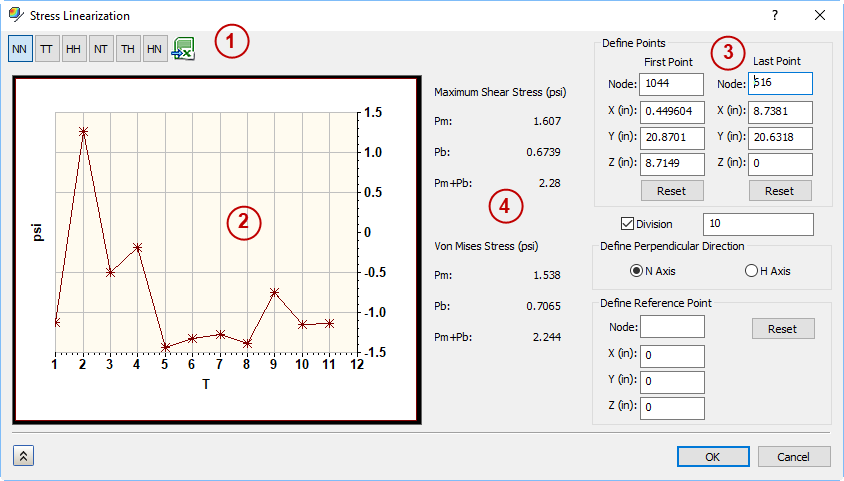
The Stress Linearization utility dialog includes the following controls, as numbered in the figure above:
- Local Stress Tensors: These selections allow you to choose which result to plot in the graph. The green button
 is used to save the numeric results in a .CSV file
- Stress Linearization Graph: The graph displays the local stress tensor results along the currently defined Stress Classification Line (SCL).
- Linearization Controls: The linearization controls allow you to specify the first and last point to define the SCL. You can also define the orientation of the local stress tensor graph.
- Stress Linearization Results: Results are displayed for both the Maximum Shear Stress and the Von Mises Stress:
- Pm: The general primary membrane stress intensity for the current SCL.
- Pb: The primary bending stress intensity for the current SCL.
- Pm + Pb: The total primary stress for the current SCL (sum of the primary bending and primary membrane stresses).
More details are provided in the following topics.