Thermal Analysis
Run the analysis from the command line:
$ pan -b DEDComp_thermal
After the analysis completes, the last few lines of the output file DEDComp thermal.out should be similar to the following:
Increment end
CPU wall for increment 1115 = 00:00:00.03, since start = 00:02:53.95
Layer end
Finished writing file . DEDComp thermal.case

Analysis completed

****************************
1 Warning
****************************

CPU wall = 00:02:54.01
CPU total = 01:16:45.82

Peak RAM used for this process = 119,280 kB

END Autodesk Netfabb Local Simulation
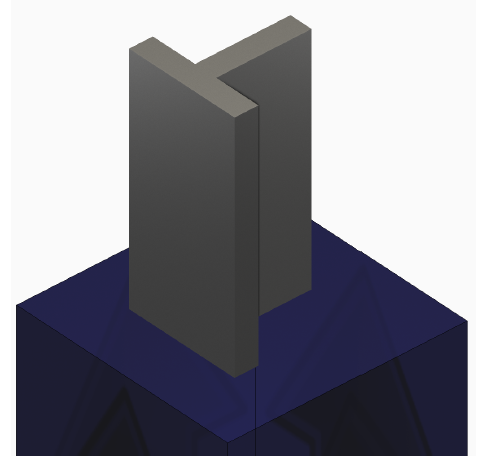
Figure 1: DED compensation example geometry
Mechanical Analysis
Run the analysis from the command line:
$ pan -b DEDCOMP_mechanical
After the analysis completes, the last few lines of the output file DEDComp mechanical.out should be similar to the following:
Increment end
CPU wall for increment 1166 = 00:00:00.17, since start = 00:05:33.47
inc =   1167 time =   3897.0000   iter =   1 eps =   0.10971E-10
Finished writing file results . DEDComp mechanical 1167.case
Increment end
CPU wall for increment 1167 = 00:00:00.16, since start = 00:05:33.63
Layer end

----------------------
*COOL time increment
----------------------
HTOR is being set to zero***
inc = 1168 time = 3947.0000 iter = 1 eps = 0.12895E+03
inc = 1168 time = 3947.0000 iter = 2 eps = 0.10316E+03
inc = 1168 time = 3947.0000 iter = 3 eps = 0.11167E-10
Finished writing file results DEDComp mechanical 1168.case
Increment end
CPU wall for increment 1168 = 00:00:00.35, since start = 00:05:33.98
Layer end

------------------------------------------------------
Total number of equilibrium iterations: 3910
Finished writing file . DEDComp mechanical.case

Analysis completed

****************************
1 Warning
****************************

CPU wall for cooldown = 00:00:00.77
CPU wall = 00:05:34.40
CPU total = 02:29:52.57

Peak RAM used for this process = 215,556 kB

END Autodesk Netfabb Local Simulation
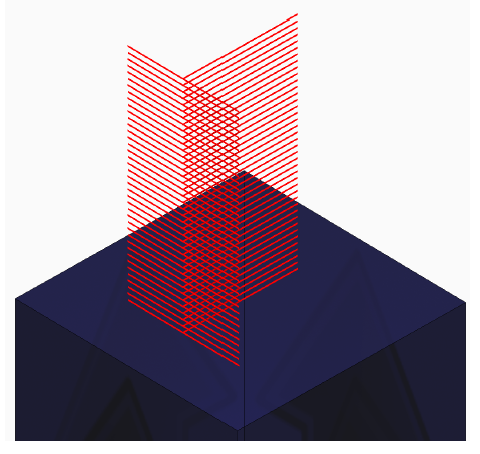
Figure 2: DED compensation example path
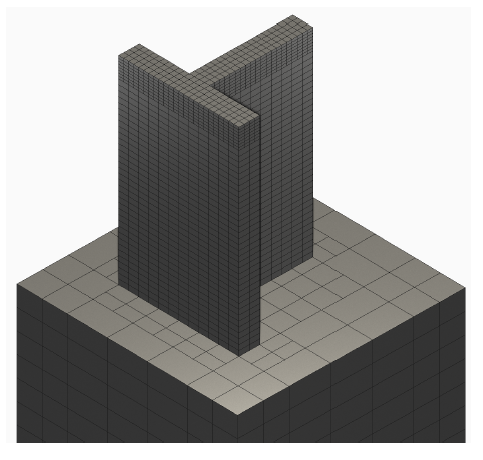
Figure 3: DED compensation example mesh