When you have selected Delay, PowerInspect does not prompt you to probe each feature as it is created. Instead, when you are ready to measure the items you have created, you must choose one of the play options in the Manual panel on the Measure tab. Click:
- Play Item, to measure the selected item in the sequence.
- Play All, to measure all unmeasured items in the sequence.
- Resume Measure, to add points to the selected item in the sequence.
To measure all unmeasured items in the inspection sequence:
- Click Measure tab > Manual panel > Play All.
PowerInspect prompts you to take the points for each unmeasured item (Circle 1 and Circle 2) in the order in which they appear in the sequence.
When you have completed the measurements, the symbols shown alongside the measured items change.
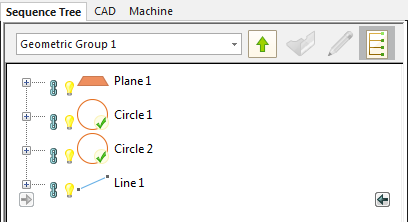
 indicates the item's results are within tolerance.
 indicates one or more of the item's results are out-of-tolerance.
 - If you want to remeasure an out-of-tolerance item, right-click its entry in the inspection sequence, and then select Play Item from the context menu. Alternatively, select its entry in the sequence, and then click Measure tab > Manual panel > Play Item.