Advanced OpenGL Settings in the Visualization Menu
Find these options under Visualization > Advanced OpenGL Settings.
Realtime Shadow
Only available in OpenGL mode.
Activates/deactivates real time shadows.
Ambient Occlusion Shadows
Activates ambient occlusion calculation.
Screen Space Ambient Occlusion Settings
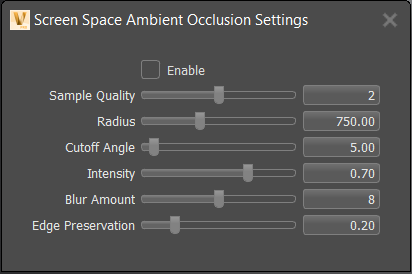
For 2021.3, we improved the quality of SSAO (screen space ambient occlusion) when rendering to provide significantly better quality with less artifacts and more possiblities to adjust the appearance.
Opens the Screen Space Ambient Occlusion Settings dialog for enabling SSAO and defining the following options:
Enable
Enables screen space ambient occlusion.
Sample Quality
Sets the sample quality used for calculating the ambient occlusion.
Radius
Sets the radius in world space to calculate the ambient occlusion. The radius of the virtual hemisphere outside the occlusion is ignored. However, since this is a screen space effect, there are a lot of limitations.
If the radius gets too large, the effect stops working.
Cutoff Angle
Prevents self-shadowing on a flat surface, since the depth channel is not accurate. It sets a cutoff angle to avoid shadowing on surfaces with a smooth curvature. If the angle between the surface plane and vector to the sample point is less than the cutoff angle, the sample will be ignored.
Intensity
Sets the darkness of the occlusion. The higher the value, the darker the shadows.
Blur Amount
The amount of blur to apply to the occlusion.
SSAO provides an efficient, realtime approximation of the baked ambient occlusion (AO). Although SSAO will never be as good as precomputed AO, or even baked lighting and shadows, SSAO is good for quick previews.
Edge Preservation
Sets an edge preservation factor forthe blur filter.
- A value of 0 ignores any discontinuities in the depth channel and filters everything.
- A value of 1 only filters values at exactly the same depth.
Geometry Light Sources
Only in OpenGL render mode and only active if Realtime Shadow is selected.
Treats self-illuminated geometries as light source.
Backface Culling
Activates/deactivates backface culling. Backface culling renders only the faces with normals pointing toward the camera.
Occlusion Culling
Renders visible geometries only; the render engine excludes polygons/patches hidden by other objects on rendering.
Depth Only Pass
Renders the scene once, using only the depth values. It can be used for optimization with complex shaders.