UVW モディファイヤのギズモの位置を、選択した面に合わせる方法はありますか。
次のコードは、UVW_Map モディファイヤの「法線位置合わせ」機能を実装します。[法線位置合わせ](Normal Align)ボタンを押しても、MAXScript には直接アクセスできません。この関数は置換関数として使用でき、ベクトルの乗積の有用性を理解する場合に役立ちます。
スクリプト:
    fn alignUVGizmo theObj theFace =
    (
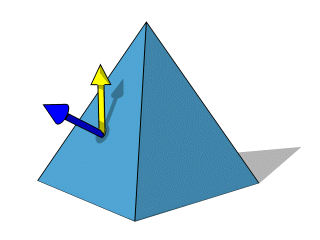
    -- First get the face normal vector.
    -- It is shown in BLUE on the image
    faceNormal = in coordsys theObj (getFaceNormal theObj theFace)
    -- This is the desired up vector in world space
    -- It is shown in YELLOW on the image
    worldUpVector = [0,0,1]
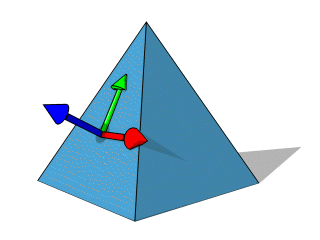
    -- Now get the cross-product of the face normal and the up vector.
    -- This will give you a vector that is perpendicular to the plane defined
    -- by the normal and the up vector. Normalize it to get a normal vector
    -- pointing to the right.
    -- It is shown in RED on the image
    rightVector = normalize (cross worldUpVector faceNormal)
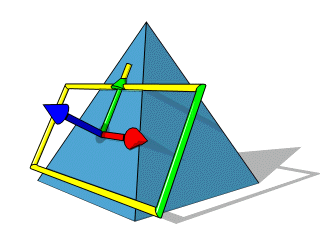
    -- Now using the face normal and the new vector,
    -- get a vector that is perpendicular to the plane defined by the two.
    -- This is the "local up vector", the vector that is the projection of
    -- the world up vector on the face you selected. This one is perpendicular
    -- to both the face normal and the right vector, and you have 3 normals now
    -- that define the X, Y and Z of your new orthogonal coordinate system
    -- for the UVW gizmo!
    -- Note that this new vector can be seen as the SHADOW of the World Up vector
    -- on the face of the object in the above image.
    -- It is now displayed in green in the image below:
    upVector = normalize ( cross rightVector faceNormal )
    -- Using the 3 vectors, define a matrix3 value which represents the
    -- coordinate system of the gizmo. The face normal is the Z axis,
    -- the right vector is the X axis, and the local up vector is the Y axis:
    theMatrix = matrix3 rightVector upVector faceNormal [0,0,0]
    theMap = Uvwmap()
    modPanel.addModToSelection theMap ui: on
    theMap.gizmo.transform = theMatrix
    )