About the Automotive Assets library
The Automotive Assets Library provides common VRED materials that you can load into Alias as read-only approximations of the VRED materials. When you send a file to VRED, the Alias approximation is discarded and VRED uses the associated VRED material instead. Use the Material Editor to create and modify the common VRED materials for use in Alias.
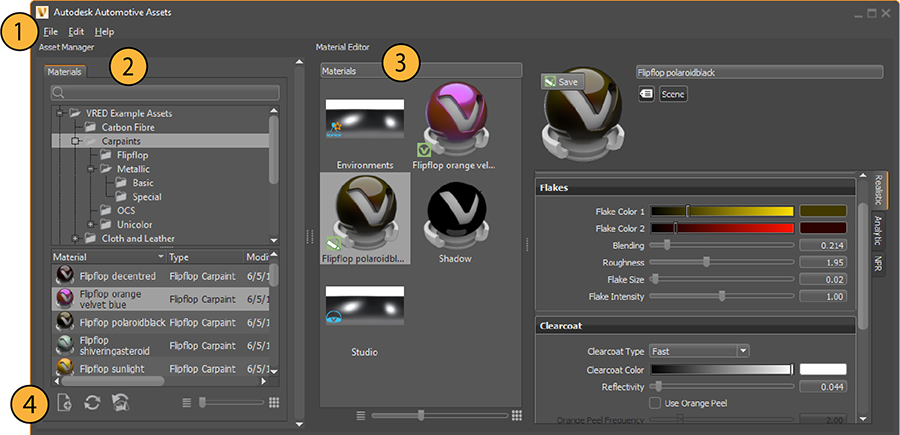
The Asset Manager is comprised of the following:
1. Menu bar
Edit > Preferences: Use the preferences to set up asset paths, either for complete assets or for scenes, materials, and environments, individually.
2. Materials tab
Lists all the VRED common materials in the Automotive Assets library, and where the materials are stored.
3. Materials Editor
The Materials Editor is comprised of two sections:
- Materials Preview Pane - See Materials Preview Pane in the VRED User Guide for more information, including descriptions of context-menu items.
- Attribute Pane - See Attribute Pane in the VRED User Guide for descriptions for the most noteworthy material attributes.
4. Icons Bar
Contains visual shortcuts for commonly used commands.
-
 - Import: Imports VRED materials into the asset library. Only VRED OSB material files can be imported. OSB is the proprietary file format used in VRED for scene objects including materials.
 -
 - Reload Directory: Refreshes the asset library to include changes, such as the addition of directories or new materials, made by others using the library. Any changes you make to the asset library appear automatically without needing to use Reload Directory.
 -
 - Update Assets in Scene: When editing a material in the Material Editor, selecting this option lets you include any changes made to the material by other users while you were making your edits to the material.