Show or hide CVs and other object features
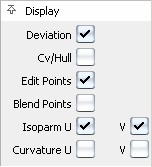
Click the check boxes in the Display section of the Modeling control panel to show or hide different features of the geometry.
The Display section also contains controls for showing/hiding the following features on the picked objects:
Deviation comb locators.
Isoparametric curves along U and V.
Curvature comb locators across U and V (created with the Control Panel > Curvature Tool).
or
- Choose ObjectDisplay > Control

 .
. - Set Scope to Active and turn on the checkboxes (to show) or off (to hide).
- Click Go.