Shade surfaces with color
How to use the Diagnostic Shading tools to switch between wireframe and shaded modes, and assess the quality of surfaces.
Shade the picked surfaces with color
- Click the
 button in the Diagnostic Shade window.
Shade the picked surfaces with random colors
Click the
 button in the Diagnostic Shade window.
This allows you to see the layout of adjacent surfaces more clearly.
Unshade the picked surfaces (switch to wireframe)
- Click the
 button in the Diagnostic Shade window.
Adjust the options of a shading mode
Click a shader icon to display its options at the bottom of the Diagnostic Shade window.
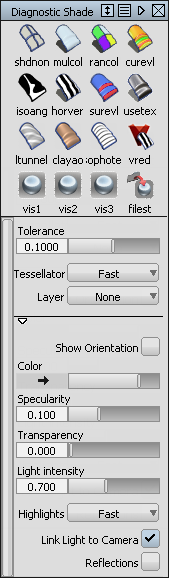 Tip:
Tip:When surfaces are partially transparent you can pick geometry “through” them. Open the options section of the Diagnostic Shade window and turn up the Transparency setting.
Set the shaded color
Pick the surface or surfaces.
The options appear at the bottom of the Diagnostic Shade window.
Click the color swatch to show to color editor.
How does setting the color in Multi Color mode affect objects?
- If you have picked objects, you will set the color of those objects. This only sets the color shown in this shading mode. It does not affect the rendered appearance (shader) of the objects.
- If nothing is picked, you will set the color of all objects, even objects to which you have already assigned custom colors. If you accidentally reset your colors, use Undo.
Related Tasks
- Shade surfaces with a render preview of their rendered appearance
- Shade surfaces as a hidden line drawing