Show CVs on picked objects
Click the Cv/Hull checkbox in the Display section of the Modeling control panel.
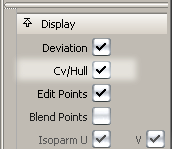
or do the following:
- Choose ObjectDisplay > Control

 .
. - Set Scope to Active and turn on the CVs checkbox.
- Click Go.
Note:
If CVs are not displayed, clicking on the object(s) while inside the Transform CV tool automatically turns on all CVs and hulls. As soon as you choose a different tool, the CVs and hulls are turned off again.