Subdivision > Extrude
Generates new faces from curves, subdivision edges, faces, or NURBS surface edges by extruding the selected components.
Use this tool to modify an existing subdivision body by adding faces along a vector. You can also use it to generate new subdivision topology from any type of curve, including free curves, curves-on-surfaces, or trimmed surface edges.
Subdivision Extrude options
Direction Type
Specifies the direction of the extrusion. Choose Normal to extrude along the edge and surface U and V directions. Choose Global to extrude along the X, Z, or Y axes.
Weld Together
When on, continuous edges or faces are merged and extruded.
Edge as New Bodies
When on, a new subdivision body is created from an extruded edge.
Pick Type options
Subdiv Faces
Extrudes only selected subdivision faces.
SubdivEdges
Extrudes only selected subdivision edges and curves.
Curves/Surface Edges
Extrudes only selected curves of all types, including or NURBS surface edges.
All
Performs extrusion depending on the current selection.
Rebuild Curve Options
Divisions
Specifies the number of CVs to add along an extruded curve.
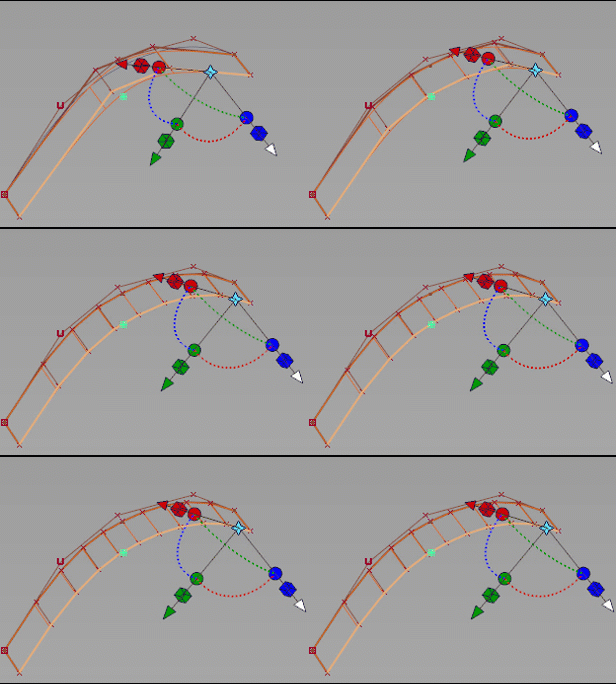
Divisions: 3 to 10
Mode
Specifies how the CVs get distributed along the extruded curve.
Parametric - Uses the parametric space to distribute the CVs.
Uniform - Distributes the CVs evenly along the length of the input curve. When you select this mode, you can use Curvature Bias to adjust the how curvature affects the distribution. For example, you can add Curvature Bias to distribute more of the CVs to areas with greater curvature.
Curvature Bias
This option is only available when the Mode is set to Uniform. When set to 0, the CVs are evenly distributed. As you increase this value, the input curve's curvature has a greater affect on how the CVs get distributed. For example, more CVs get placed in the areas of greatest curvature. Use this to produce smoother extruded surfaces particularly around areas with pronounced curvature.