Creates a mesh between four contiguous edges or curves.
Access Methods
Tool Set:
.

Menu: .
Summary
Select four adjoining edges that define the mesh. The edges can be lines, arcs, splines, or open polylines. The edges must touch at their endpoints to form a single, closed loop.
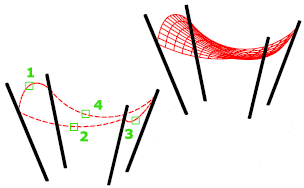
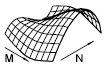
You can select the four edges in any order. The first edge (SURFTAB1) determines the M direction of the generated mesh, which extends from the endpoint closest to the selection point to the other end. The two edges that touch the first edge form the N edges (SURFTAB2) of the mesh.
The MESHTYPE system variable sets which type of mesh is created. Mesh objects are created by default. Set the variable to 0 to create legacy polyface or polygon mesh.
List of Prompts
The following prompts are displayed.
- Object 1 for surface edge
-
Specifies the first edge to be used as a boundary.
- Object 2 for surface edge
-
Specifies the second edge to be used as a boundary.
- Object 3 for surface edge
-
Specifies the third edge to be used as a boundary.
- Object 4 for surface edge
-
Specifies the final edge to be used as a boundary.