You can browse and attach materials from the Material Browser.
Material Browser
Use the Materials Browser to navigate, sort, search, select materials for use in your drawing, and attach a material to an object.
The standard Autodesk materials library is are accessible from the Materials Browser.
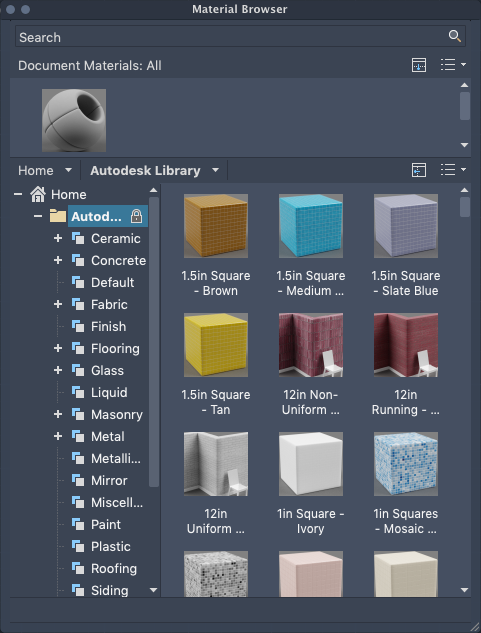
The Materials Browser contains the following main components:
- Search. Allows you to locate a material in the library without navigating through the library's organized structure.
- Document materials. Displays a set of display options for the materials saved in the current drawing. You can sort the document materials by name, type, and color.
- Autodesk library. Displays the Autodesk library, which contains the predefined materials that come with the product. It also contains a button for controlling the display of libraries and library categories. You can sort the materials in the library by name, category, type, and color.
- Library details. Displays previews of the materials in the selected categories.
- View options. Contains controls that allow you to control the display style and size of the material previews.
Autodesk Library
The Autodesk library, with over 700 materials and over 1000 textures, is included with the product. The library is read-only and cannot be modified.