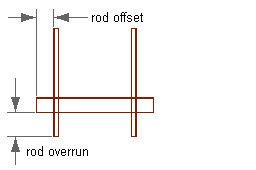
A hanger style specifies two structural member styles that define
- The type of drop rod to use
- The type of channel to use
You need to create these structural member styles before creating a hanger style.
Tip: To create a structural member style, switch to the Architecture workspace, click


 , and create a style .
, and create a style . To create a hanger style
- Click
.

- In the left pane, expand Multi-Purpose Objects, and select the Hanger Styles category.
If the Hanger Styles node is not listed under Multi-Purpose Objects, enter the HANGERADD command and follow the prompts to add a hanger to your drawing.
- In the left pane, expand Multi-Purpose Objects, and select the Hanger Styles category.
- Create the style, and configure its general properties as described in Creating Styles.
- Click the Hangers tab.
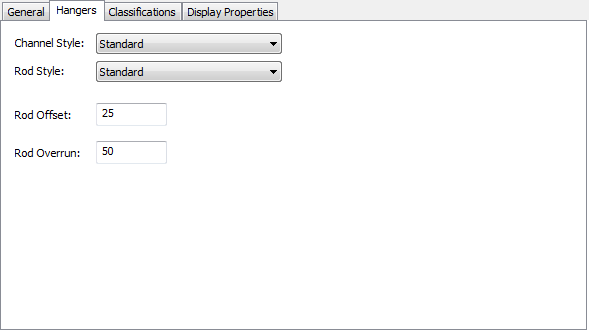
- For Channel Style, select the structural member style to represent the channel. Attention: You can select from the structural member styles in the current drawing that include both of the following words in their names or descriptions: hanger and channel.
- For Rod Style, select the structural member style to represent the rod. Attention: You can select from the structural member styles in the current drawing that include both of the following words in their names or descriptions: hanger and rod.
- For Rod Offset, enter the distance between the edge of the support and the rod.
- For Rod Overrun, enter the distance between the bottom of the support and the end of the rod.