Increase detail in aero and combustion simulations
There are several ways to increase the detail of aero and combustion simulations.
Decrease detail size
The fluid_detail_size set on the source_air node determines the size of the smallest details of air flow that can be resolved. Decreasing this value increases the resolution of the simulation.
Another setting on the source_air that affects the detail size is geo_volume_mode. When this is set to Absolute, the detail size is in world units, meaning that large emitters result in more voxels than small ones. When it is set to the default Relative, simulations with large and small emitters have roughly the same number of voxels.
You can also decrease geo_detail_size on source_air, and detail_size on collider nodes, to increase the accuracy of emission and collisions.
Be careful not to decrease the detail size too much, especially in Absolute mode. Too many voxels can greatly increase memory requirements and computation time.
Apply sharpening
If a simulation is too smooth, connecting an aero_refinement_settings node to the aero_solver_settings node's additional_settings can be a relatively inexpensive way to increase detail.
Keep sharpening_amount low. Increase sharpening_radius for sharper results, but high values take longer to compute.
Boost detail with points
The boost_detail_with_points option on the aero_sharpening_settings node adds particles to the simulation. This can reduce diffusion and provide more detailed results, at the cost of more memory and longer computations.
When this option is active, you can output aero_points from the simulate_aero node to the host scene to visualize the points for debugging purposes.
Refine aero after simulation (BIFROST-4681)
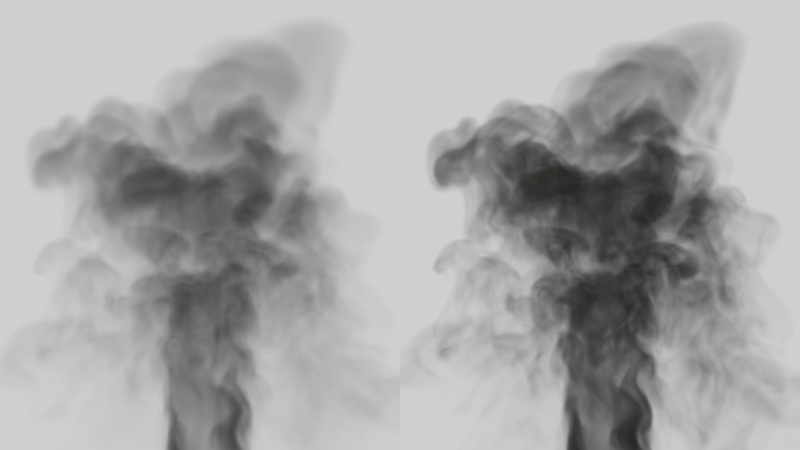
The post_refine_aero node enhances detail in aero effects after simulation. It still requires the original aero sources and colliders, but it can also be applied to a file cache.
It is generally faster than connecting an aero_refinement_settings node into the additional_settings port of aero_solver_settings, but the extra detail is not fed back into the simulation.
-
Plug the result of an aero simulation into the
aero_volumeport of apost_refine_aeronode. -
Set the
refinement_levelsas desired. High levels take longer to compute and may create artifacts. -
Connect the aero sources and colliders from the original simulation. This tells the node where it can and cannot add detail.
-
Play the scene through. Note that the frames must be played in order, even when refining cached files.