This section of the Post Process Kinematic Survey dialog box contains the Civil 3D coordinate geometry points information when the raw RINEX data has been processed.
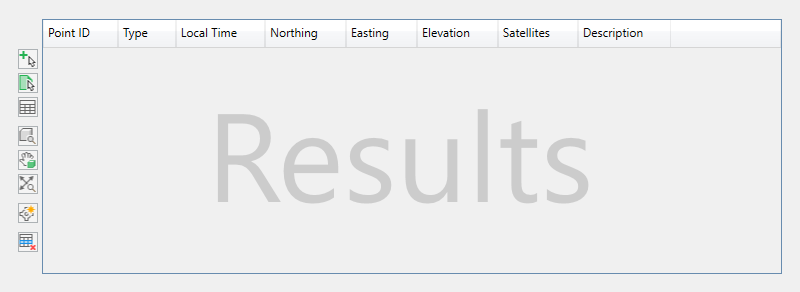
Processed results are displayed in a data grid and can be previewed in the Civil 3D drawing area; however, points are not created as COGO data in the drawing until you manually insert them.
The columns of information are defined as follows.
Point ID. Specifies the unique name of the observation.
Type. Specifies the classification of the observation, either BasePoint, Calculated, Kinematic, or Occupied.
GPS Time. Specifies the GPS time of the observation.
Local Time. Specifies the local time of the observation.
Northing. Specifies the projected northing coordinate of the observation.
Easting. Specifies the projected easting coordinate of the observation.
Elevation. Specifies the projected elevation coordinate of the observation.
Latitude. Specifies the geographical latitude coordinate of the observation.
Longitude. Specifies the geographical longitude coordinate of the observation.
Height. Specifies the geographical ellipsoidal height of the observation in meters.
X-ECEF. Specifies the geocentric X coordinate of the observation in meters.
Y-ECEF. Specifies the geocentric X coordinate of the observation in meters.
Z-ECEF. Specifies the geocentric X coordinate of the observation in meters.
Q. Specifies the quality of the observation, either 0 (none) 1 (fixed), 2 (float), 4 (DGPS), or 5 (single).
Satellites. Specifies the number of visible satellites at the time of the observation.
Velocity. Specifies the minimum of the in and out velocities for each observation and is represented in the drawing unit per second.
SdN. Specifies the North-position component of the standard deviations in meters.
SdE. Specifies the East-position component of the standard deviations in meters.
SdU. Specifies the Up-position component of the standard deviations in meters.
SdNE. Specifies the square root of the absolute value of the Northeast component of the estimated covariance matrix.
SdEU. Specifies the square root of the absolute value of the East/Up component of the estimated covariance matrix.
SdUN. Specifies the square root of the absolute value of the Up/North component of the estimated covariance matrix.
Description. A field in which to make any notes or additional information about the observation. Click in the cell to type a description.
 Select Nearest in Drawing Window. Selects the point closest to where you click in the drawing area. Once selected, the point is highlighted in the Processed Data Results section.
 Select by Window. Selects multiple points in the drawing area. Click two locations in the drawing area to select the area in which points are selected. Once selected, the points are highlighted in the Processed Data Results section.
 Clear Selection. Clears the selection of the currently highlighted points in the Processed Data Results grid.
 Zoom to. Zooms the drawing area to view the currently selected points.
 Pan to. Pans the drawing area to view the currently selected points.
-
 Zoom All. Zooms the drawing area to view all of the processed points in the Results section.
 Insert Point. Inserts the selected points as COGO data into the drawing.
 Remove Point
. Removes the selected points from the processed Results section and from the drawing. If points classified as Observed are removed, calculated points will be recalculated. Kinematic points may also be removed if needed.
Note: Points are removed from the active cache in memory and not the raw RINEX data files. Removed points can be reprocessed though this does not affect points previously inserted in the drawing.
Remove Point
. Removes the selected points from the processed Results section and from the drawing. If points classified as Observed are removed, calculated points will be recalculated. Kinematic points may also be removed if needed.
Note: Points are removed from the active cache in memory and not the raw RINEX data files. Removed points can be reprocessed though this does not affect points previously inserted in the drawing.
- Click a point to select it.
- Press and hold Ctrl to select multiple points.
- Press and hold Shift to select a range of points.