This section of the Post Process Kinematic Survey dialog box allows for adding and removing the raw data to be processed and visualized.
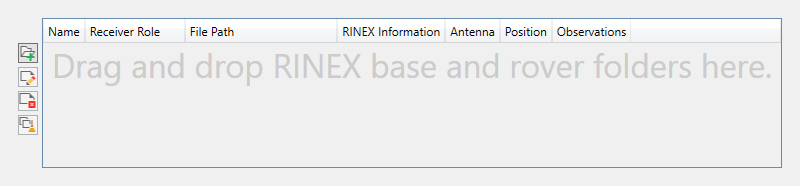
Once the data is imported, it is displayed in the main data grid to the right. The columns of information are defined as follows:
Name. Specifies the unique name of the receiver.
Receiver Role. Specifies the role of the receiver, either Base, Autonomous, or Rover.
File Path. Shows the file path for each of the data files associated with the receiver.
RINEX Information. Specifies the RINEX navigation and observation data version and type of the receiver files.
Antenna. Specifies the relative coordinate position (XYZ) of the receiver.
Position. Specifies the absolute position of the receiver. Rovers will not report a position.
Observations. Specifies the first and last (start and finish) time stamps and interval scale of the survey for each of the receivers.
 Add Files. Opens a Windows browser to find RINEX files to import into the PPK for Civil 3D tool. Once files or folders are selected, click Open to import the raw data.
It is recommended to have base and rover data in separate folders. Multiple rover inputs are allowed if each rover maintains unique occupation (*.??o) and navigation (*.??n) file names.
-
 Edit. Opens the
Receiver Information dialog box for a selected receiver in the Raw RINEX Data File Information section. Navigation files, antenna, and other coordinate/location information can be edited from this dialog box.
Edit. Opens the
Receiver Information dialog box for a selected receiver in the Raw RINEX Data File Information section. Navigation files, antenna, and other coordinate/location information can be edited from this dialog box.
 Remove Files. Removes the selected receiver from the Raw RINEX Data File Information section. This does not delete the source files.
 Clear All Files. Removes all receivers from the Raw RINEX Data File Information section. This does not delete the source files.