The Semantic keyer is a keyer part of the Selective node, available in Action and Image. This keyer uses a machine learning model to automatically extract features it has been trained to recognize, and then create a matte out of skies, human bodies, human heads, or human face features.
If your image contains more than one person and you're using a Human (body, head, face) keyer, you target a specific person, the Human keyers allow you to also extract a single object from the image.
To target a specific talent:
- In the Selective node, open the Semantic Keyer menu.
- Select a Human keyer (body, head, face) and click Active.
- Set Target Selection to Selected.
- In a viewport, display the Selective Input (F9) view.
A yellow crosshair appears in the middle of the viewport.
- Move the crosshair onto target the talent to isolate.
Notice how the crosshair snaps to the talent; t he larger the crosshair, the better the recognition.
- If the target moves from frame to frame, enable Auto Key and animate the crosshair to follow the target. Use the Min and Max fields to expand or restrict the coverage.
Semantic Keyer - Salient
Use the Salient keyer to isolate the most obvious object within a bounding box.
The Salient keyer is not object specific (as opposed to other semantic keyers such as Sky or Human Head), and tries to isolate any object within the box.
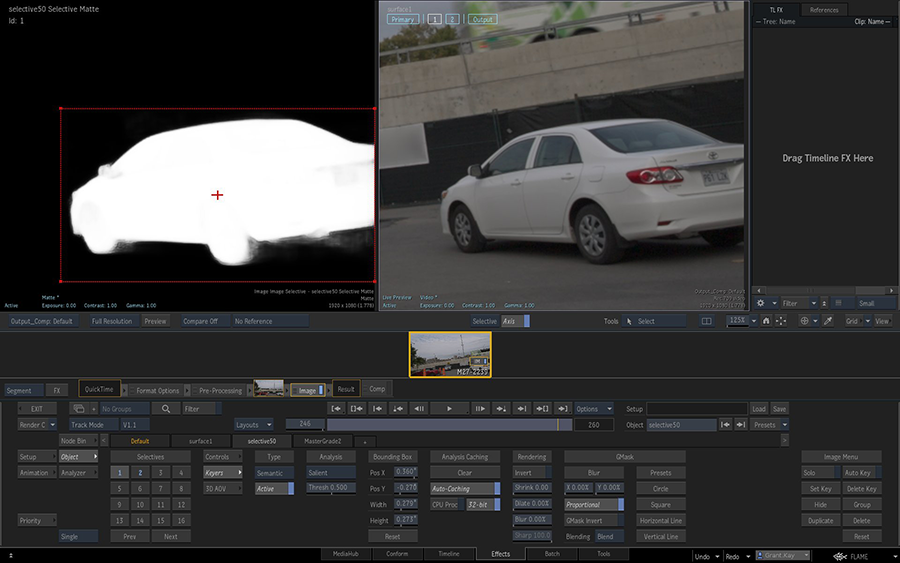

To key an object using the Salient Object keyer:
- Select a Selective from the Selectives HUD.
- In the Selective menu, open the Keyers menu.
- Set Type to Semantic.
- Set Analysis Mode to Salient.
- Click Active.
To see Salient in action:
- Display a 2-Up view using ALT+2.
- Select a viewport and press
F9 until you get to the Selective Matte view.
The viewport now displays the matte of the isolation performed by the Salient keyer.
- In the other viewport, press
F9 until you get to the Selective Input view.
The viewport highlights with an overlay the items being detected by the Salient keyer within the red bounding box.
- Use Threshold to control the quality of the isolation.
The Salient keyer does not recognize object but shapes, you must tell it where to look: it then looks within that area to detect a shape. And you tell it where to look using the bounding box as it is the area of the image analyzed by the Salient keyer.
To isolate a specific object:
- In a viewport, use F9 to display the Selective Matte or Selective Input view.
- Use the cursor to move and resize the bounding box to focus the Salient keyer on a specific object.
You can also use the controls in the Salient object menu to move the bounding box.
Note: You can set keys and animate the bounding box over time.
Semantic Keyer - Human Face
The Human Face semantic keyer allows you to isolate specific areas of a human face.
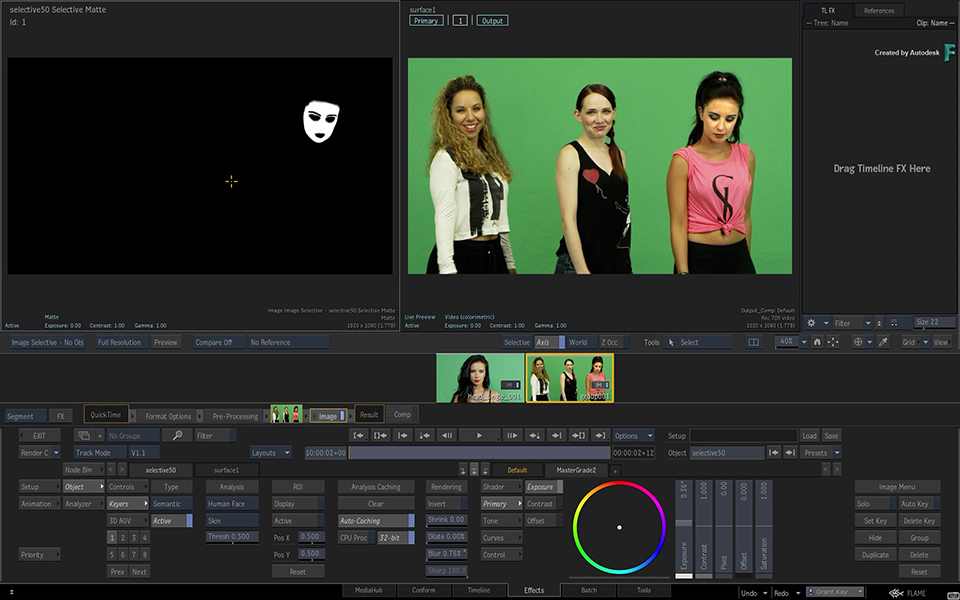
Available human face areas:
- Cheeks: The skin section located over the cheeks bone.
- Chin: The skin section under the bottom lip.
- Crow's Feet: The skin section right next to the eyes going towards the ears.
- Ears: Both ears.
- Eyes: The whole eyes, including the Pupils, Eye Whites, and Eye Bags selections.
- Eye Bags: The skin section right under the eyes.
- Eye Whites: Only the white part of the eyes.
- Eyebrows: The centre section of the eyebrows over the bones right up the eyes section. Since Eyebrows coverage vary so much in between different persons, use the Dilate and Blur controls from Post Rendering section to manage the matte coverage.
- Forehead: The skin section above the eyebrows.
- Irises: The centre colour of the eye minus the Eye Whites and Pupils section.
- Laugh Creases: The skin section right next to the nose and going down to the mouth corners.
- Lips: Covers only the lips section.
- Media Input: Use the Media Input assigned to the Selective node as a custom preset. To modify the existing preset, or create your own, edit the supplied MLHumanFaceTemplates in Paint or GMask Tracer.
- Nose: Covers mainly the middle section of the nose excluding the nostrils.
- Shine Zone: Includes the Forehead, Nose ridge, Cheeks and Chin.
- Skin: The whole of the face minus the eyes, the lips and the mouth.
- Skin Right Side: Only for right side of the face.
- Skin Left Side: Only for left side of the face.
- Teeth: Only the teeth.
- T Zone: The Nose ridge and Forehead section.
- Upper Lip: The area between the upper lip and the nose.