MLHumanFaceExtraction outputs matte coverage automatically based on a preset selection. The MLHumanFaceExtraction is also available as a semantic keyer in the Selective node available in Image and Action.
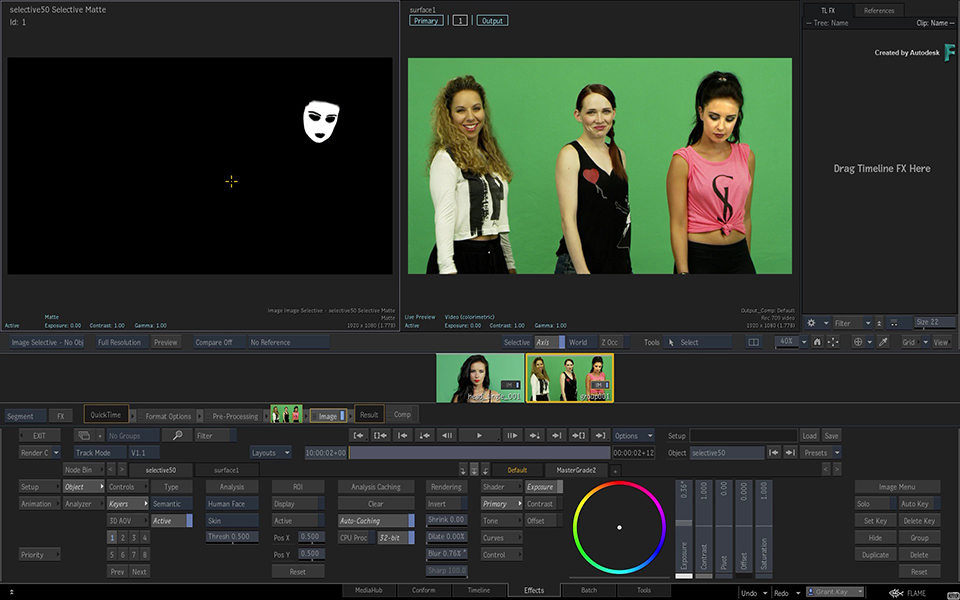

To create a matte from a facial feature:
- In Batch, connect a Matchbox node the media Front.
- Select the MLHumanFaceExtraction Matchbox and load it.
- In the Matchbox node, use Presets to select the feature to extract in a matte.
You can only isolate one human face at the time. If the shot contains more than one person, you must select the face to isolate.
To select the face to isolate:
- In the Face Selection section, enable Icon.
- Display the media Front.
- Drag the icon over the face to isolate.
Animate the icon if the face moves out from under the icon over the length of the shot.
Available human face areas:
- Cheeks: The skin section located over the cheeks bone.
- Chin: The skin section under the bottom lip.
- Crow's Feet: The skin section right next to the eyes going towards the ears.
- Ears: Both ears.
- Eyes: The whole eyes, including the Pupils, Eye Whites, and Eye Bags selections.
- Eye Bags: The skin section right under the eyes.
- Eye Whites: Only the white part of the eyes.
- Eyebrows: The centre section of the eyebrows over the bones right up the eyes section. Since Eyebrows coverage vary so much in between different persons, use the Dilate and Blur controls from Post Rendering section to manage the matte coverage.
- Forehead: The skin section above the eyebrows.
- Irises: The centre colour of the eye minus the Eye Whites and Pupils section.
- Laugh Creases: The skin section right next to the nose and going down to the mouth corners.
- Lips: Covers only the lips section.
- Media Input: Use the Media Input assigned to the Selective node as a custom preset. To modify the existing preset, or create your own, edit the supplied MLHumanFaceTemplates in Paint or GMask Tracer.
- Nose: Covers mainly the middle section of the nose excluding the nostrils.
- Shine Zone: Includes the Forehead, Nose ridge, Cheeks and Chin.
- Skin: The whole of the face minus the eyes, the lips and the mouth.
- Skin Right Side: Only for right side of the face.
- Skin Left Side: Only for left side of the face.
- Teeth: Only the teeth.
- T Zone: The Nose ridge and Forehead section.
- Upper Lip: The area between the upper lip and the nose.