Flame Family 2022.1 ships with Backburner version 2022.1.0.12.
Backburner is automatically installed and updated when you install a Flame Family product.
If you're in an environment running Backburner Manager on a dedicated workstation, make sure to also install Backburner 2022.1.0.12 on that workstation to benefit from the latest fixes. Use the Backburner standalone installer available on the Autodesk online store. Search for Backburner.
This latest version includes the latest Backburner Monitor application and bug fixes.
- Upgrading Backburner no longer enables the Manager if it was disabled in a previous installation.
- The number of supplemental groups ID is no longer limited to 100.
- Backburner Monitor improvements. See below.
Backburner 2022.1.0.12 is compatible with previous Flame Family product versions.
Backburner Monitor Events Monitoring Port Range
In the Backburner Monitor Settings menu, you can set Backburner Monitor to use events to refresh the displayed data.
In this Update, you can now set range of the network ports used to monitor these events. You have two options: let the OS set the range, or define one.
To define a port range for events monitoring:
- Display the Backburner Monitor Settings menu.
- Uncheck
Use OS dynamic port range.
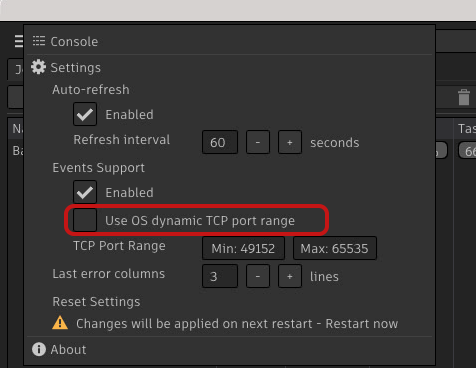
- Set a range by entering minimum and maximum port values.
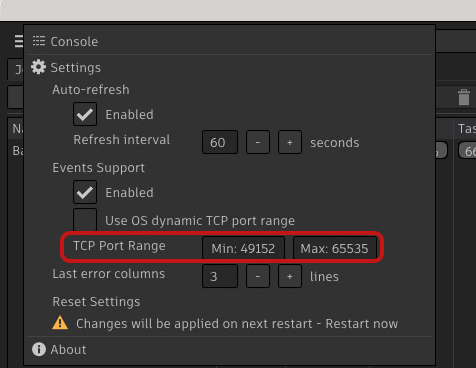
- Restart Backburner Monitor to use these new values.
To let the OS set the port range for events monitoring:
- Display the Backburner Monitor Settings menu.
- Check
Use OS dynamic port range.
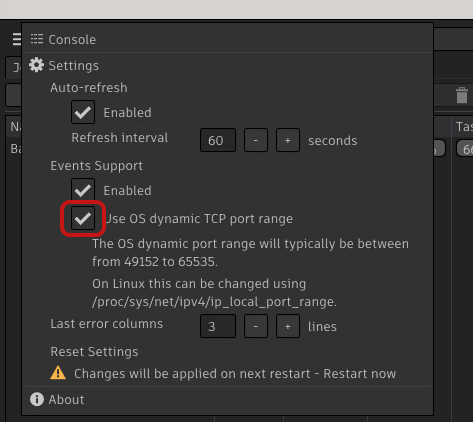
- Restart Backburner Monitor to use dynamic port range.
You can also define the Wiretap events monitoring range port via the command line with the following options:
- -m <ip[:port]>: Address:port of Backburner manager to connect to.
-
-e <minPort>[:<maxPort>]: Defines a WireTap events TCP port range.
- -e <minPort>:<maxPort>: Defines the range of ports used to monitor the events.
- -e <port>: Defines a single port to monitor the events.
- -e -1: Uses the OS dynamic port range (default).
Additional Backburner Monitor Improvements
- The main window position and pop-up window states are now persisted between sessions.
- Pop-up windows now correctly resize when resizing main window.
- The desktop shortcut is now correctly associated with the owning application.
- On CentOS 8.2, the Backburner Monitor icons are now high resolution.
- The Remaining and Elapsed columns now update properly.
Finally, in previous versions you could resize the Backburner Monitor window so small it became unusable. You can no longer do that.