Fitting connections are used to maintain the fixed relationship between components in a tube and pipe assembly. You can connect fittings, free route ends, and normal Inventor components to other components. You can also insert fittings between 2 connected fittings or a connected fitting and a pipe segment.
When placing fittings from the Content Center using AutoDrop or from your project work space using the Place Fitting command, you can also connect the fitting being placed to another base component. After the connection is created, use the Edit Fitting Orientation command to rotate the free fitting to a new orientation or switch the connection point on the free fitting.
When a rigid route is populated, conduit parts and fittings are generated from the Content Center based on the style criteria. Fittings can also be manually placed into a tube and pipe assembly from the Content Center using AutoDrop or from your project workspace.
What are base fittings and free fittings?
If the free fitting is being inserted between 2 connected fittings or a fitting and a pipe segment, the part must be a fitting and the fitting must have 2 connections. The connections need not be collinear. The base fittings must be 2 connected fittings or a fitting connected to a pipe segment. In this case the base fitting specifies the connection that constrains the position and routing of the fitting group. When a fitting is inserted, the base fitting (1) that controls the route point (2) does not move. The inserted fitting (1) and other adjacent fittings (2) adjust accordingly, and the pipe segment is trimmed back to accommodate the change.
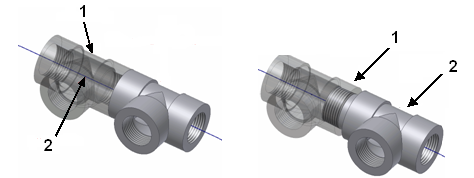
If the free fitting is being connected anywhere other than between existing connected fittings, the free fitting can be a fitting, conduit part, free route end, or normal Inventor part in the active run. If the free fitting is a free route end, the system automatically creates an auto route region to accomplish the connection. Otherwise, it is always positioned relative to the base fitting during updates and other operations. The base fitting can be a fitting, a conduit part, free route end, or a normal Inventor part that is located anywhere within the assembly. It specifies the connection that constrains the position and routing of the free fitting.
What are valid fitting connections?
The free fitting must be in the active run. The base fitting can be either in the active run or outside the run. They are not limited to connections between 2 fittings. The following connection types are available:
- Connect a free fitting to another base fitting, free route end, or normal Inventor part. If the free fitting is being inserted between 2 connected fittings or a fitting connected to a pipe segment, then the valid connections are limited to existing connected fittings.
- Connect a free component to another base fitting, free route end, or normal Inventor part.
- Connect a free route end to another base fitting or normal Inventor part. The system automatically creates an auto route region to accomplish the connection.
Which fitting connections can be modified?
You can delete fitting connections and edit the engagement when they are formed:
- By using the Connect Fittings command.
- By dropping a fitting on the end of a pipe segment or adjacent to other fittings.
You cannot edit the engagement for fitting connections or delete fitting connections when they are:
- Connections driven by a route point in a route or another fitting (for example, a fitting dropped on a pipe segment is also driven by a route point in a route). Note that connections of the other fitting can be deleted.
- Hose connections formed during hose creation.
- Pipe or tube connections formed by the system during automatic routing or by dropping a fitting on to the pipe segment.
You can edit the engagement between fittings in a group of multiple adjacent fittings, however, you cannot edit the engagement between the last fitting in the group and another component. You also cannot delete connections of any fittings in a group since the connection is driven by the base fitting. The base fitting is driven by the route point.
How are fitting connections modified?
Different changes can be made for fitting connections, depending on the context of edits:
- Change the engagement type for fitting connections. Available engagement types include Free Fitting, Base Fitting, and User Defined.
- Break connections to accommodate changes to the tube and pipe assembly, such as moving and rotating the fitting and connecting the fitting to a newly inserted or existing component. For example, if the diameter between 2 fittings does not match, you can break the connection, move the fittings apart, insert a reducer, and then connect the reducer between the existing fittings or components.
- Trim or extend free tube and pipe ends to get the correct engagement for tube and pipe segments to connect to fittings.