The Softimage operator stack is the history of all the operators (such as deformation and topology modifications) applied to an object. Every operation in Softimage creates an operator. At any time you can go back and modify or delete operators in the stack, working in a non-destructive way.
Similarly, in Maya you can work in a non-destructive way with operations in the undo queue. Maya is built around nodes that are connected in a dependency graph (DG). Most Maya operations modify, remove, or rewire existing nodes; a small subset create nodes. Operation results can be modified by changing/reconnecting nodes in the DG; or, they can be reverted to a previous state and/or reapplied through the undo queue.
For more information regarding the DG, see Dependency graph. See also Construction history, Node types, and Nodes and attributes.
Use the Node Editor in Maya to see the DG. See Displaying connections in the Node Editor for more information.
For a comparison of the Softimage Construction History and Operator Stack with Maya's Dependency Graph and Construction History, watch this video: Softimage to Maya bridge: Understanding Maya's Dependency Graph.
| In Softimage | ...becomes in Maya |
|---|---|
|
Immediate Mode |
Turn off the Construction History icon
|
|
Freeze button |
: Alt+Shift+D |
|
Freeze M button |
Click this command's options box and select History before deformers only to delete operations that happened before deformers (such as deleting modeling operations that happened before skinning), but keeps operations that happen after the deformers. |
|
Primitive base property |
Primitive History node |
|
Geometry operator |
Shape node |
|
Visibility property |
Render Stats and Object Display attributes on Shape node |
|
Kinematics property |
Transform node |
|
Material property plus shader |
initialShading node plus shader node |
 in the status line
Reversing operations
There are multiple ways in which you can reverse the order of two operations. The solution depends on the operations that you are trying to reverse, and may include:
- Disconnect the nodes that have been operated on and reconnect them in the opposite order
- Set different attribute values
- Delete existing nodes
- Create different types of nodes (for example, when changing a deformation type)
Along with the ability to reverse operations, the Node Editor also provides additional advantages. It allows you to visualize the relationships between the nodes while creating a node network. Furthermore, while the operator stack is a linear graph, Maya allows more advanced operations such as connecting one output to multiple inputs, or connecting the output of a downstream node to the input of an upstream node.
For information on how to connect nodes in the Node Editor, see Connect nodes by dragging connection lines.
Example
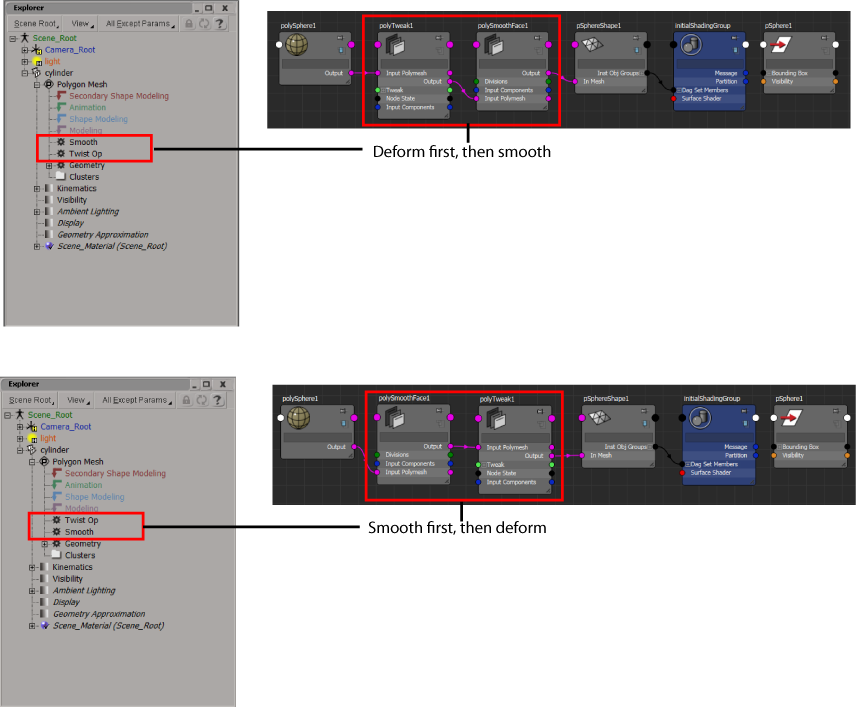
The following example compares how to reverse the order of two operations, deform and smooth, in Maya and Softimage.
In Softimage, you can use the operator stack to reverse the Twist Op and Smooth operations.
In Maya, use the Node Editor to disconnect and reconnect your polyTweak and polySmoothFace nodes.