Displays the available symbols for the selected component definition.
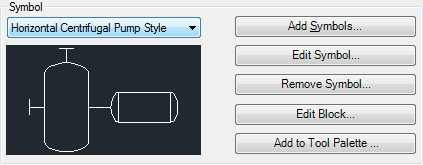
Symbol Drop-down List
Displays the names of the available symbols for the selected P&ID component definition.
- Add Symbols
-
Displays the Add Symbols - Select Symbols dialog box, where you can open one or more drawings containing symbols and select the ones you want to add. Once you have added multiple symbols, you can assign them to class definitions.
- Edit Symbol
-
Displays the Symbol Settings dialog box, where you can modify a symbol’s settings.
- Remove Symbol
-
Deletes the selected symbol.
- Edit Block
-
Displays the AutoCAD Block Editor, where you can modify the block and its attributes.
- Add to Tool Palette
-
Adds the new tool to the active tool palette.