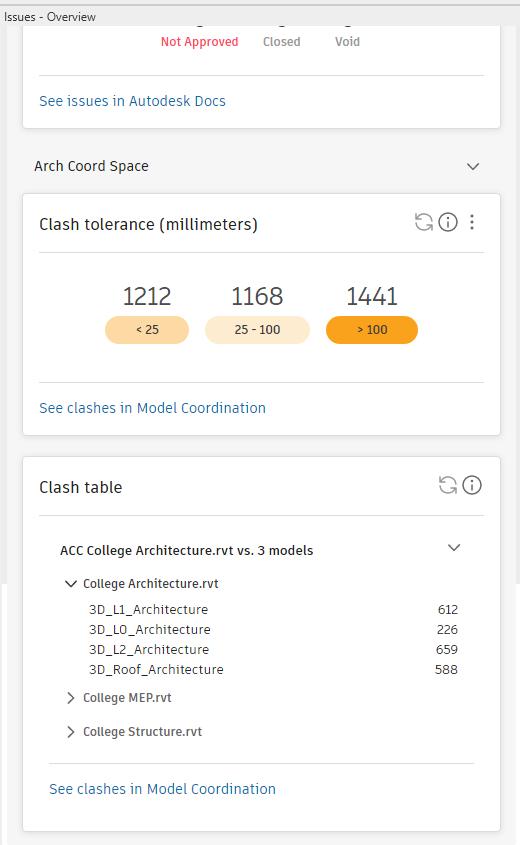
The Overview panel displays additional Autodesk Construction Cloud data in the Revit Issues Add-In.
The Overview panel contains a collection of cards, each card representing a different Autodesk Construction Cloud feature. The Overview panel can be launched independently from the Issues tab
 Issues panel in Revit.
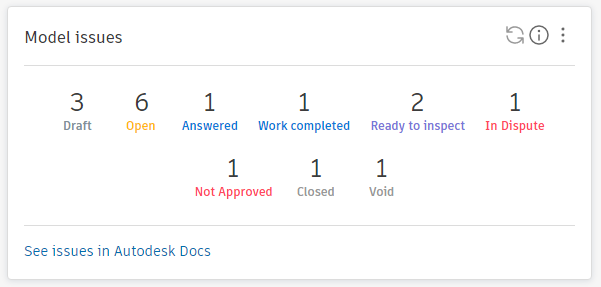
- Model Issues:
The Model Issues card displays the number of issues of each status for the model selected in the Model Selector. The link at the bottom of the card opens thes issues list for the model in Autodesk Construction Cloud or Autodesk Docs.
Note: The link text will change depending on the project type.
Select the issue statuses you are interested in by clicking on the menu and checking the status you want to see on the panel.
This selection is stored separately for each user and each project.
- Clash Table Card:
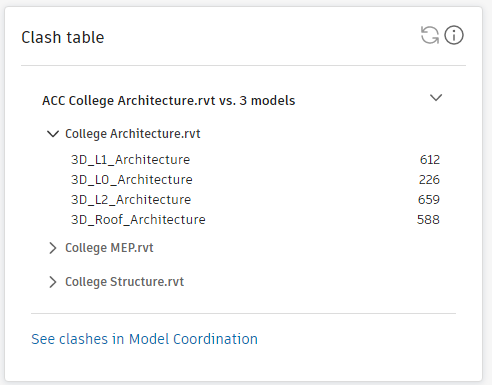
The Clash Table card shows the clash results for the currently selected model against the other models in the selected coordination space.
Details of the results for each model can be viewed by clicking on the relevant arrow in the tree.
You can add or remove models from the Clash table in the Revit Issues Add-in Overview panel
The link at the bottom of the card opens the clash table for the model in the selected coordination space.
- Clash Tolerance Card:The clash tolerance card reports the number of clash issues reported for the model within user-defined tolerance ranges. Click the link at the bottom of the clash tolerance card to open the clash table for the model in the selected coordination space.
Determine settings for the tolerance card by clicking the ellipses menu. In the settings menu, switch between imperial and metric systems and define the ranges for clash tolerance.
The lower limit and upper limits of the tolerance range define the lower and upper values to use for the central bucket.
Clashes with a tolerance lower than the lower limit will be placed in the first bucket.
Clashes with a tolerance higher than the upper limit will be placed in the last bucket.