About Optimize
Scene > Optimize
Opens the module for optimizing geometry, transformations, sharing, and materials for improved render performance. Its default activates a recommended selection that could increase render performance, clear deselects all selected modules, and optimize executes selected optimization commands. All operations are applied recursively. Multi-selection is supported on execution. Undo for these types of actions is not available.
The Optimize Module
The Optimize module contains an assortment of options, grouped into five categories, Reduction, Filter, Flush/Unflush, Share, and Optimizations.
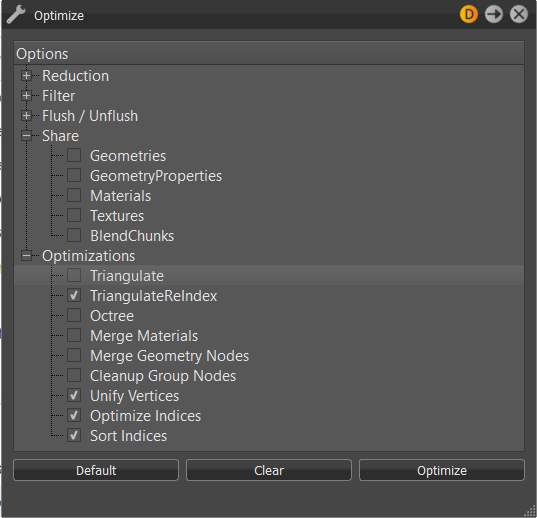
Reduction
- 16-bit Lengths, 16-bit Indices - Changes the lengths and indices of a geometry to a 16-bit data type.
Filter
Remove Point - Removes all point objects within the selection.
Remove Lines - Removes all line objects within the selection.
Remove LODs (Keep Best Quality) - Removes all LODs nodes within the selection. Child instances with the highest mesh resolution are kept and replace the LOD nodes.
Remove LODs (Keep Lowest Quality) - Removes all LODs nodes within selection. Child instances with lowest amount of polygons are kept and replace the LOD nodes.
Remove Switches - Removes all switch nodes within the selection. The last child instance is kept and replaces the switch node.
Remove Vertex Normals - Removes all existing vertex normals from the selection.
Remove Vertex Color #1 and #2 - When imported objects contain two different RGB values for each vertex point (edge point of polygons), these two values are known as the vertex color. This feature removes the existing vertex color information from the shape nodes.
Remove Texture Coordinates #1 - #7 - Removes existing texture coordinates from the related channel. The first channel is without a number and is used for UV texture mapping in VRED materials. There are 5 additional channels (#1, #2, #3, #4 and #6), which can be used for other purposes, such as custom shaders. Channel #5 is for baked direct illumination. Channel #7 is for baked indirect illumination and baked ambient occlusion.
Remove Material Group Nodes with No Children - Removes all unassigned materials within the Materials module.
Remove Empty Group Nodes - Removes group nodes that contain no child nodes.
Remove Empty Geometry Nodes - Incorrect usage on external geometry editors could generate shape nodes that contain no polygons. These types of shape nodes imported to VRED could decrease runtime stability. This feature deletes such shape nodes.
Remove Empty Shell Nodes - Automatically removes empty shell nodes in a scene.
Remove Identity Transforms - Removes identity transform nodes within the selection.
Remove Transform Variants - Removes all transform variants within the selection. If not enabled, when also flushing transformations, nodes with a transform variant will be omitted from flushing.
Remove Invalid Texture Coordinates - Imported objects could contain invalid texture coordinates. This feature helps to remove that type of information.
Remove Degenerated Polygons - Removes shape nodes that cannot be drawn from the render engine.
Remove Animations - Removes existing animation from selection.
Remove FileInfo/References - Removes the file information and converts the reference to a VRED group.
Remove B-Side Nodes - B-Side nodes are comparable to the No Show feature in CAD software. Execution removes shapes and components set as B-Side.
Flush/Unflush
Object transformation could be realized in two different ways within the Scene Graph. Either the transformation is stored within the object itself (flushed) or the related information is stored within group nodes on a higher hierarchy level above (unflushed). Nodes that contain transformations have a symbol of an axis in front of their icon  . Several transformations on different levels are accumulated. Nodes containing transform variants and their parent nodes will remain unaffected by the Flush Transformation functions. To flush these nodes, enable Filter - Remove Transform Variants.
Flush Transformation Nodes (Adjust Face Normals) - Moves transform information from transform nodes to the geometry nodes on the lowest level. Face normals are recalculated upon execution.
Flush Transformation Translation - Moves the translation-related transform information of the selected sub-tree to the geometry nodes on the lowest level.
Flush Transformation Rotation - Moves the rotation-related transform information of the selected sub-tree to the geometry nodes on the lowest level.
Flush Transformation Scales - Moves the scale-related transform information of the selected sub-tree to the geometry nodes on the lowest level.
Flush Selected Transformations - Flushes transform information from selected node.
Flush Transformation Nodes -Moves the transform information of the selected sub-tree to the geometry nodes on the lowest level.
Flush Material Group Nodes - Material assignment in VRED can be done by assignment to the object itself or to a material group node on a higher hierarchy level. Execution moves unflushed material definitions from the material group node of the object.
Unflush Material Group Nodes - Creates a material group node above each geometrical node within the selection and moves the material definition there.
Flush Texgens - Converts TexGenChunk information to texture coordinates within the object on the level below.
Flush Textransformations - Converts TextureTransformChunk information to texture coordinates within the object on the level below.
Share
Sharing improves OpenGL render and raytracing performance because required objects are not present several times within the system memory. Shared instances are indicated by an underlined node description inside the scene tree. Any change on a shared object affects the cloned instance and vice versa.
Geometries - Looks for identical objects (identical polygon meshes) within the selection and references all occurrences.
GeometryProperties - References all occurrences of duplicated geometry properties.
Materials - References all occurrences of duplicated materials.
Textures - References all occurrences of duplicated textures.
BlendChunks - References all occurrences of duplicated Blend Chunks.
Optimization
Triangulate - Converts all types of polygon meshes into triangles. Faces with four and more edges are split into the appropriate number of triangles.
TriangulateReIndex - Indices of vertices must be defined in a counterclockwise order upon creation. Following this rule increases runtime stability and render performance. This option converts all types of polygon meshes into triangles and applies the regeneration of all vertex indices.
Octree - This type of tree structure provides constant branches within the scene tree. Every node contains either eight nodes or none. Execution restructures the scene tree in that way.
Merge Materials - Merges identical materials into one.
Merge Geometry Nodes - Merges geometrical nodes into one contiguous object. Regarding objects are unshared, identical material are assigned, and all objects that should be combined are located within same group node.
Cleanup Group Nodes - CAD-generated data can contain deep branches on their created trees. A group node can contain a group node that contains a group node, and so on. At the end, there is one shape node in a nested arrangement of group nodes. This option automatically deletes these types of nested groups without removing the shape nodes itself. Group nodes that contain two or less shapes are considered upon execution.
Unify Vertices - Every triangulated polygon has three vertices; one at every edge. Polygons located directly beside one another should share as many vertices as possible to increase render performance. This option looks for identical, but not shared vertices, and combines them.
Optimize Indices - Tries to improve vertex cache efficiency by reordering triangle indices.
Sort Indices - Sorts indices from selection.