Carbon/Carbon 2D
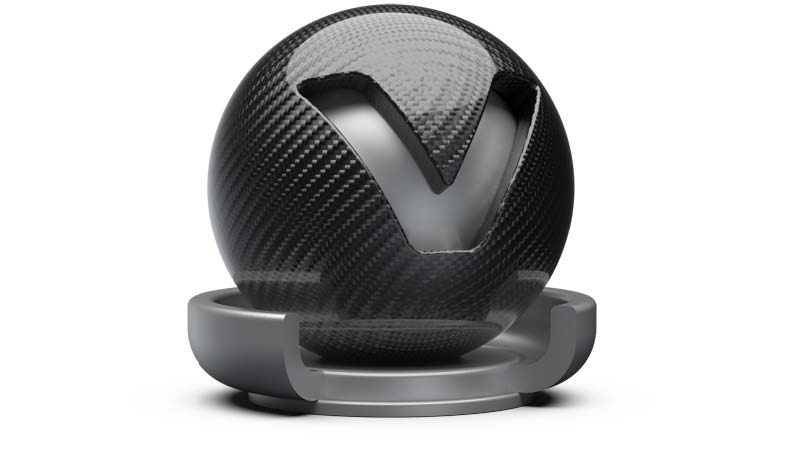
Carbon fiber, found in light weight sports vehicles, is a woven fiber-pattern material type with a clearcoat layer. Four preset pattern types are available and are customizable within the Carbon Pattern properties.
Carbon is a triplanar shader; Carbon 2D uses the UV layout of an object.
Triplanar Carbon Material/Carbon Material
-
Diffuse Color - Sets the shader’s diffuse reflection color. The shader adopts this color when the light reflection of the surface is spread in many directions.
-
Glossy Color - The higher the brightness the higher the reflection on the surface. Black means no reflection; white gives full reflection. Click the color field on the right to open the color chooser; when the glossy reflection is colored, reflected objects are also colored.
-
Roughness - The roughness parameter controls light reflections on top of the surface. The higher the value the rougher the microscopic structure on top of the surface and the more blurred are the reflections.
Clearcoat Settings
Sets the clearcoat color. The clearcoat is a transparent, highly reflective paint layer on the base metal layer.
-
Clearcoat Type - The Fresnel Term describes the intensity of a reflection based on the viewing angle. Its intensity at normal incidence is set by the material’s reflectivity.
- Off - Turns off the clear coat.
- Fast - Uses a fast but less accurate approximation to the Fresnel Term.
- Accurate - Uses a physically accurate evaluation of the Fresnel Term.
-
Clearcoat Color - Sets the clearcoat color.
-
Reflectivity - Sets the clearcoat reflective intensity.
Carbon Pattern
-
Pattern type - There are several different pattern types, according to the carbon structures typically sewn.
- 2 X 2
- 3 X 1 Staircase
- 3 X 1 Interleave
- 5 X 1
-
Pattern Size - Sets the carbon structure size.
-
Pattern Intensity - Sets the fissure depth intensity.
-
Rotate X,Y,Z - Sets the pattern direction on x, y, and z projection direction. Respectively, for Carbon 2D the slider Rotate adjusts the pattern's rotation value.
Bump Texture
-
Use Structure - Activates a procedural bump structure.
-
Bump Intensity - Sets the bump intensity interpretation of the bump image texture.
-
Structure Size - Sets the structure size when the procedural bump structure is activated.
For further information on the Incandescence, Transparency, Displacement, Raytracing, and Common settings, refer to the General Truelight Material Settings section.