Shadow
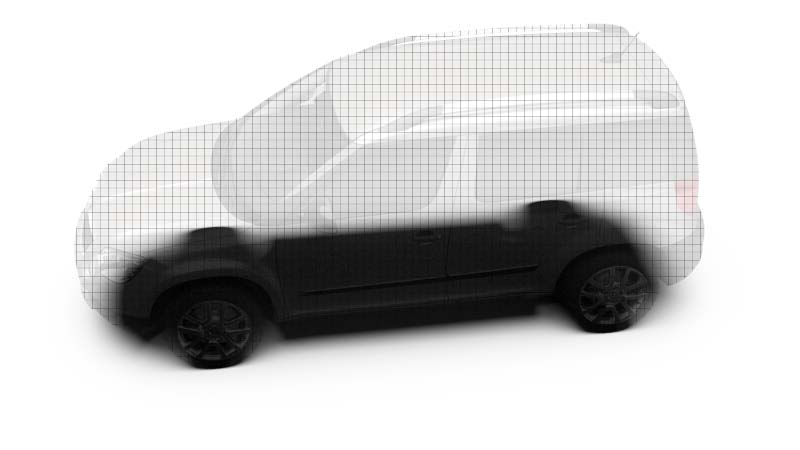
The Shadow material is a transparent material by default. It is shaded only in areas of pre-calculated ambient occlusion shadows, shadows calculated by linear lights sources, or global illumination light sources. It is also capable of receiving diffuse and glossy reflections to simulate wet or mirroring surfaces.
Shadow Material Settings
-
Occlusion Color - Sets the color of the pre-calculated ambient occlusion or environment shadows.
-
Occlusion Intensity - Controls the intensity of shadowed areas.
-
Shadow Color - Sets the color for shadows from light sources (like point lights).
-
Opacity Mode Settings - Contains the following options:
- Transparent - Renders the Shadow transparent by default.
- Solid - Renders the Shadow white by default.
-
Sort Key - Sets the render priority of the Shadow. Only supported in OpenGL mode.
Reflection
-
Reflection Mode - Offers three different reflection modes:
- Diffuse only - Shows only the diffuse reflections.
- Glossy only - Shows only the glossy reflections.
- Diffuse + Glossy - Shows the diffuse and glossy reflections.
-
Diffuse Color - Sets the shader diffuse reflection color, the color the shader takes on when the light reflection of the surface is spread in many directions.
-
Glossy Color - Sets the shader’s color for glossy reflections.
-
Reflectivity - Sets the material reflectivity intensity.
-
Roughness - The roughness parameter defines the amount of diffuse reflection and its complement specular reflection. The higher the roughness value, the more diffuse reflections are rendered
For further information on Raytracing settings, refer to the General Truelight Material Settings section.