The primary point that defines the geometry of the feature lines is called an intersection point (IP). It is represented by a triangle symbol in the Level Editor, or when a feature line editing command is used. The IP appears as a standard square grip when grip editing a feature line.
You can insert level points along a feature line to define gradient breaks. The level points do not break the horizontal geometry of the feature line. They are represented by the circle symbol for both the feature line commands and grip editing. When grip editing, you can drag a level point to a different position along the feature line.
When two feature lines cross at a location where neither one has a IP point, a split point is created. This is displayed in the editor with a white triangle, rather than a green IP triangle.
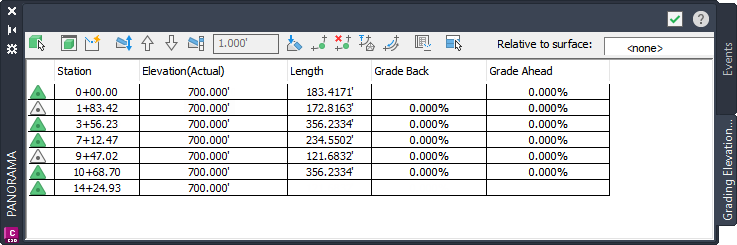
Figure 1: Level Editor, showing two split points
In figure 1, the Elevation Editor shows the elevations for the square feature lines, including two split points where these lines cross other feature lines. In the Level Editor, the point symbol in the first column includes a plus sign (+) at any point that intersects with another feature line.