Troubleshoot selection set messages
This topic includes information about why some actions generate in-product message or prompt line messages while working with selection sets.
Messages encountered while selecting items to add to a set
When picking objects to add to an existing set or a new set, you may receive one or more these warning messages in the Alias prompt line.
Some items were not added as they are not supported.
Solution: Ensure that you only include items supported by selection sets in your pick list.
Supported items include the following:
- Curves (all types)
- NURBS surfaces
- subdivision bodies
- Object components, including CVs, vertices, edges, and faces.
- Mesh objects, including imported meshes.
- Lights
- Cameras
Some items were not added as they are exclusive to another set.
Solution: You can make a set exclusive, which means that items in the exclusive set cannot be added to other sets.
To resolve this, make the set inclusive so that you can add its members to other sets. To make a set inclusive, do one of the following:
Click the Exclusive icon (
 ) to the right of the exclusive set.
The Multiple icon (
 ) now appears instead, which indicates the set is no long exclusive.
Right-click the set and select
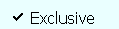 to turn exclusivity off.
Some items were not added as they are a parent/child of an item in the set.
Solution: If an item already exists in the set hierarchy, either as a parent at the top of the set hierarchy, or a child lower in the set hierarchy you cannot add a second instance of the item to the set.