Create a curve offset with Curves > Curve & COS Offset
Offset a curve using the Curve & COS Offset tool
In the Curves tool palette, select the Curve & COS Offset tool
 .
.Pick the curve you want to offset. The offset appears in a different color than the picked curve with an arrow indicating the direction of the offset. The image below displays offsets of multiple curve and an offset of single curve.
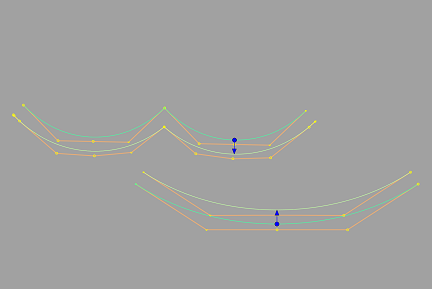
Do any of the following:
Drag the arrow left and right using the
 to change the offset distance. You can also change the offset direction by dragging the arrow head or clicking the base of the arrow.
In the Curve & COS Offset Control window, type a number or use the slider to set the Offset Distance exactly and specify other options for the offset.
Note:You can specify a positive or negative Offset Distance value to create a curve offset on either side of the original curve.
Specify whether you want the Offset Distance to be measured by chordal length or arc length by setting the Offset Measure option. For more information, see Offset Measure.
Select additional curves (or de-select them) by holding the
 key while clicking them or using a pick box.