Cut meshes
How to cut a mesh along degree 1 curves-on-mesh to create components.
Cut a mesh along projected curves
In the Mesh tool palette, select Mesh Partitioning, then click the Mesh Cut tool
 .
.Follow the tool’s prompts to select the mesh and projected curve(s). (The curves must still have their construction history intact.)
Click the Cut button in the lower right corner of the window.
Triangles along the projected curves boundaries are split to create the individual components (see diagram below).
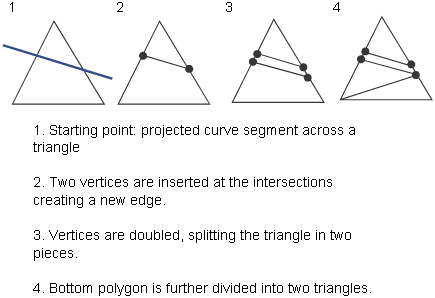 Note:
Note:At this point, you can follow the next steps to divide (subset) the mesh into separate objects, or you can exit the tool and divide up the mesh, later using the Mesh > Mesh Partitioning > Mesh Subset tool
 .
.
Further subset the mesh into separate meshes corresponding to the components
Select one or more components (regions between boundary curves) by clicking on them.
Click the Keep, Discard, or Divide button (in the lower right corner of the window) depending on the type of operation you want to perform.
Keep: Keeps the components selected in step 4 (as one single mesh), and discards the rest.
Discard: Discards the components selected in step 4, and keeps the rest (as one single mesh).
Divide: Extracts all components and makes them separate mesh objects.
The smoothness of the new edges on the sub-meshes is equivalent to that of the input curves.
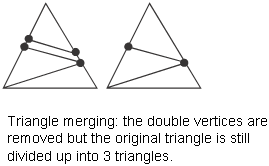
Note:Once the mesh is partitioned, the split triangles cannot be fused back together to become one single triangle again, even after the logical surfaces are joined to create one mesh using the Mesh > Mesh Partitioning > Mesh Merge tool
 .
.
Construction history
If the curves-on-mesh were created from intersecting the mesh (with another mesh or a surface), then used to cut and subset the mesh, you can retain construction history by ensuring that the Keep intersection history option is turned on in the Mesh Cut tool.
When Keep intersection history is on (the default), moving any of the constructor objects will update the intersection.